

Start with Echoza if comment-driven visibility is your goal. It drafts personalized comments in your voice, holds them for your approval before anything posts, and schedules them across working hours with daily caps built in. For everything else, the market splits cleanly into four categories: email finders for lead enrichment, automation tools for outreach sequences, content helpers for post creation, and analytics tools for measuring what works.
Quick TL;DR picks by use case:
- Comment-driven visibility: Echoza — draft-and-approve workflow, voice profiles, multi-account support
- Email enrichment: Lusha or Apollo.io — fast contact reveals with CRM sync
- Outreach automation: PhantomBuster or Waalaxy — click-triggered or sequenced campaigns
- Content creation: AuthoredUp or Taplio — formatting, scheduling, and AI drafting
- Distraction control: News Feed Eradicator — hides the feed so you stay focused
The Chrome Web Store hosts a large number of LinkedIn-related extensions, but a significant share are abandoned, poorly maintained, or carry real account risk. The picks below are drawn from actively maintained tools with documented privacy policies and real user bases.
Key Takeaways
The best LinkedIn Chrome extensions share one trait: they reduce manual work without removing the human from the loop on actions that carry account risk.
| Point | Details |
|---|---|
| Start with one extension | Install the tool that solves your primary problem first; adding more before validating the first creates conflicts and noise. |
| Draft-and-approve is the safest automation model | Tools like Echoza that hold every action for human approval carry low account risk compared to fully automated posting tools. |
| Verify enrichment accuracy before scaling | Test any email-finder against 20–30 known contacts before committing credits to a large list. |
| Match tool category to your goal | Email finders, automation tools, content helpers, and comment tools solve different problems; using the wrong category wastes time. |
| Echoza for comment visibility | Echoza's voice profiles, approval workflow, and daily caps make it the recommended starting point for comment-driven lead generation. |
Table of Contents
- The best LinkedIn Chrome extensions at a glance
- Per-extension reviews: what each tool actually does
- How we tested and ranked these extensions
- How to choose the right LinkedIn extension for your workflow
- LinkedIn safety and policy: what automation tools can and cannot do safely
- Install and quick-start: set up safely in 10 minutes
- Why Echoza is the pick for comment-driven visibility
- When comment automation beats cold outreach
- Echoza gets you visible on LinkedIn without the cold outreach grind
- Useful sources and links
The best LinkedIn Chrome extensions at a glance
The table below covers all 49 featured tools. Risk levels reflect the degree to which an extension takes autonomous action on your LinkedIn account: Low means read-only or draft-only, Medium means click-triggered or semi-automated, High means fully automated posting or mass scraping.
| Extension | Category | Best For | Free Plan | Safety Risk | Chrome Rating |
|---|---|---|---|---|---|
| Echoza | Comment automation | Sales, recruiters, agencies | 14-day trial | Low | — |
| Lusha | Lead enrichment | Sales reps | Yes (limited credits) | Low | — |
| Wiza | Lead enrichment | Sales Navigator users | Yes | Low | — |
| Snov.io | Lead enrichment | Teams with outreach workflows | Yes | Low | — |
| Apollo.io | Lead enrichment + CRM | Sales teams | Yes | Low | — |
| ContactOut | Lead enrichment | Recruiters | Yes | Low | — |
| LeadIQ | Lead enrichment | SDRs and AEs | Yes | Low | — |
| GetProspect | Lead enrichment | Small teams | Yes | Low | — |
| Skrapp | Lead enrichment | Email-focused prospectors | Yes | Low | — |
| Uplead | Lead enrichment | Verified B2B contacts | Yes | Low | — |
| Kaspr | Lead enrichment | EU phone prospecting | Yes | Low | — |
| LeadLeaper | Lead enrichment | Solo pros | Yes | Low | — |
| Saleshandy Connect | Lead enrichment | Deliverability-focused teams | Yes | Low | — |
| SalesQL | Lead enrichment | Individual prospectors | Yes | Low | — |
| RocketReach | Lead enrichment | Broad contact coverage | Yes | Low | — |
| SignalHire | Lead enrichment | Recruiters and TA teams | Yes | Low | — |
| Hunter.io | Lead enrichment | Domain-level email search | Yes | Low | — |
| Cognism | Lead enrichment | Enterprise compliance | No | Low | — |
| Findymail | Lead enrichment | Simple email lookups | Yes | Low | — |
| Evaboot | Lead enrichment | Sales Navigator extraction | Yes | Low | — |
| Scalelist | Lead enrichment | List management utilities | Yes | Low | — |
| Leaddelta | Lead enrichment | Lightweight pipeline | Yes | Low | — |
| PhantomBuster | Automation | Scale + click-triggered control | Yes | Medium | — |
| Waalaxy | Automation | Multi-channel sequences | Yes | Medium | — |
| Dux-Soup | Automation | Profile visit automation | Yes | Medium | — |
| Octopus CRM | Automation | Automation + CRM combo | Yes | Medium | — |
| LinkedHelper 2 | Automation | Outreach sequences | No | Medium | — |
| SalesRobot | Automation | Extractor-first workflows | No | Medium | — |
| PowerIn | Automation | Scale commenting | No | High | — |
| Lemlist | Outreach | LinkedIn + email campaigns | Yes | Medium | — |
| Breakcold | Outreach | Relationship-first outreach | Yes | Medium | — |
| folk | CRM | One-click profile saving | Yes | Low | — |
| HubSpot Sales Extension | CRM | HubSpot users | Yes | Low | — |
| Taplio | Content | Content creators | Yes | Low | — |
| AuthoredUp | Content | Post formatting | Yes | Low | — |
| EasyGen | Content | Quick AI drafts | Yes | Low | — |
| Supergrow | Content | Growth-focused creators | Yes | Low | — |
| Publer | Content | Multi-network scheduling | Yes | Low | — |
| Buffer | Content | Team scheduling | Yes | Low | — |
| Grammarly | Content | Writing quality | Yes | Low | — |
| Reepl | Comment drafting | Manual-approval AI drafts | Yes | Low | — |
| EngageAI | Comment drafting | Free AI comment generation | Yes | Low | — |
| Crystal (Crystal Knows) | Analytics | Tailored outreach messaging | Yes | Low | — |
| Shield | Analytics | Post performance tracking | No | Low | — |
| Kleo | Analytics | Post-level insights | Yes | Low | — |
| News Feed Eradicator | Productivity | Distraction-free browsing | Yes | Low | — |
| LinkedIn Sales Navigator | Native platform | Advanced search + lead tracking | No | Low | — |
| Notion | Productivity | Content calendars and playbooks | Yes | Low | — |
| AuthoredUp | Content | Rich-text post preview | Yes | Low | — |
Risk note: Fully automated commenting (PowerIn) and mass scraping without click-triggers carry the highest account risk. CRM sidebars, email finders, and draft-and-approve tools sit at the low end. According to Cleverly's roundup of LinkedIn Chrome extensions, matching the tool to your primary goal — email finding, automation, or multi-channel outreach — is the single most important selection decision.
Per-extension reviews: what each tool actually does
Lead enrichment extensions
Echoza is the recommended starting point for professionals who want visibility without cold outreach volume. It ranks your feed by relevance, drafts comments in your voice, holds every draft for your approval, then schedules approved comments across working hours. Voice profiles let you maintain separate tones for different accounts or clients. Daily caps prevent the kind of activity spikes that trigger LinkedIn's risk systems. For a sales rep who wants to show up in high-visibility conversations without blasting connection requests, this is the most defensible approach.
Lusha surfaces phone numbers and emails directly on LinkedIn profiles with a clean one-click reveal UI. The credit model is straightforward: you spend a credit, you get a contact. It integrates with Salesforce, HubSpot, and Pipedrive. The free tier gives you a small monthly credit allowance, which is enough to test accuracy before committing.
Apollo.io combines a large B2B contact database with a browser extension that surfaces company and contact data while you browse profiles. The free plan is generous compared to most enrichment tools, and the CRM sync is reliable. If your team already uses Apollo's sequencing features, the extension is a natural add-on.
Wiza is purpose-built for bulk extraction from Sales Navigator lists. You run a search in Sales Navigator, Wiza pulls the results, and you export a verified list. It is not a one-by-one lookup tool; it is a list-building machine.
Snov.io pairs email finding with verification credits and connects directly to Snov.io's outreach platform. If you want to find an email and immediately drop it into a drip sequence without switching tabs, this is the tightest workflow of the email-finder category. Snov.io's own roundup covers how it fits into multi-step outreach.
- Cons: — Best value only if you use Snov.io's full platform
ContactOut focuses on recruiter workflows, pulling candidate emails and phone numbers from public sources. Coverage on technical and engineering candidates tends to be strong.
LeadIQ captures contact records and syncs them directly to your CRM with minimal friction. The standout feature is the one-click capture that writes a clean record to Salesforce or HubSpot without manual data entry.
GetProspect, Skrapp, LeadLeaper, SalesQL, Saleshandy Connect, Findymail, Evaboot, Scalelist, Leaddelta, RocketReach, SignalHire, Uplead, Kaspr, Hunter.io, Cognism all operate in the same enrichment space with varying degrees of coverage, verification quality, and pricing. Hunter.io is the strongest choice for domain-level searches. Cognism leads on compliance controls for enterprise teams. Kaspr is worth considering if your prospecting is concentrated in Europe and phone numbers matter. The rest are solid alternatives worth a free-tier test before committing to credits.
Pro Tip: Before running any enrichment tool at scale, test 20–30 lookups against contacts you already know. That sample tells you the tool's real accuracy for your specific market segment faster than any vendor claim.
Automation and outreach extensions
PhantomBuster sits at the intersection of automation and control. You trigger enrichment and data collection manually, then PhantomBuster handles the workflow at scale. The click-triggered model keeps you in the loop without requiring you to babysit every action. PhantomBuster's own testing ranked enrichment quality, CRM sync, and click-triggered safety as the top criteria for sales workflows.
Waalaxy runs multi-channel sequences across LinkedIn and email from a single interface. The automation templates make it accessible for growth teams that do not want to build sequences from scratch.
- Cons: — Medium automation risk; LinkedIn policy compliance depends on usage patterns
Dux-Soup automates profile visits, connection requests, and follow-up messages. It is one of the older tools in this category and has a large user base, but the automation model carries more account risk than click-triggered alternatives.
Octopus CRM bundles automation campaigns with a lightweight CRM inside the extension. For solo users who want one tool to handle both outreach sequences and contact management, it is a compact option.
LinkedHelper 2 offers a sequence builder for outreach at scale. It is more powerful than Dux-Soup but also requires more setup. Users comfortable managing automation risk and sequence logic will get more out of it.
PowerIn automates comment posting at scale with no approval step. That makes it the highest-risk tool in this list. LinkedIn's systems are designed to detect non-human posting patterns, and fully automated commenting is the category most likely to trigger account restrictions. Use it only if you understand and accept that risk.
Lemlist and Breakcold both extend into LinkedIn from email-first platforms. Lemlist is the stronger choice for teams running integrated LinkedIn and email campaigns with personalization at scale. Breakcold emphasizes relationship-building reminders and is better suited to account-based approaches where you are nurturing a small set of high-value contacts.
For a deeper look at automation alternatives and their safety trade-offs, the LinkedIn outreach automation tools comparison on Echoza's blog covers the key distinctions.
Content creation and productivity extensions
AuthoredUp adds a rich-text editor and post preview directly inside LinkedIn's composer. You can format text with bold, italics, and line breaks that LinkedIn's native editor makes awkward. The preview shows exactly how the post will render before you publish.
Taplio combines AI post generation with scheduling. It is the most full-featured content tool in this list, with a carousel builder and analytics layer. The free tier is limited, but the paid plan is worth it for content-focused professionals who post multiple times per week. For alternatives, the Taplio alternatives guide covers the main options.
EasyGen and Supergrow both offer quick AI drafts for posts and comments. EasyGen is faster and more template-driven; Supergrow leans toward discovery and growth features. Neither replaces a dedicated content strategy, but both cut the blank-page problem.
Grammarly works across every text field on LinkedIn, including messages, posts, and connection request notes. The free tier catches grammar and clarity issues reliably. The paid tier adds tone suggestions, which are genuinely useful when you are writing outreach messages at volume.
Publer and Buffer handle multi-platform scheduling with LinkedIn support. Buffer's team approval workflows make it the better choice for marketing teams; Publer is slightly more flexible for solo users managing multiple accounts.
News Feed Eradicator does one thing: it hides your LinkedIn feed. If you open LinkedIn to prospect or post and end up scrolling for 20 minutes, this extension solves that problem immediately.
Notion is not a LinkedIn extension in the traditional sense, but many teams use it to organize outreach templates, content calendars, and playbooks that feed directly into their LinkedIn workflows.
CRM and analytics extensions
folk saves LinkedIn profiles into a lightweight CRM with one click. It is the fastest way to build a contact list without leaving the browser. Notes, tags, and follow-up reminders are all available inside the extension.
HubSpot Sales Extension pulls your HubSpot CRM context into a sidebar while you browse LinkedIn profiles and messages. If your team runs on HubSpot, this is a no-brainer add-on.
Crystal (Crystal Knows) analyzes LinkedIn profiles and suggests communication styles based on DISC personality frameworks. It is most useful for high-stakes outreach where tailoring your message to a specific person's communication preferences could make the difference between a reply and silence.
Shield and Kleo both track LinkedIn post performance. Shield has gone through product changes; Kleo is currently the more stable option for post-level analytics outside LinkedIn's native dashboard.
LinkedIn Sales Navigator is not a Chrome extension but deserves a mention as the native platform tool that most extensions are designed to complement. Its advanced search filters and lead recommendations are the foundation most sales teams build on before adding third-party extensions.
EngageAI and Reepl both generate AI comment drafts. Reepl's Chrome Web Store listing documents its draft-and-approve model, tone customization, and the explicit design choice to avoid automated posting. Reepl is the closest direct alternative to Echoza in the comment-drafting category. The key difference: Echoza adds voice profile training, multi-account management, scheduling across working hours, and daily caps — features that matter more as you scale beyond a single account.
How we tested and ranked these extensions
Ranking 49 extensions required a consistent scoring framework. The criteria below were weighted in the order listed, with safety and data accuracy carrying the most weight.
- LinkedIn safety risk — assessed whether the tool takes autonomous action (high risk), requires click-triggers (medium), or operates in read-only or draft-only mode (low)
- Free-tier usefulness — evaluated whether the free plan delivers enough value to assess fit before paying
"The most valuable extensions are those that either reduce manual work while preserving human approval, or provide highly accurate enrichment data tied to CRM workflows. Extensions that skip the human-in-the-loop step trade short-term convenience for long-term account risk." — Synthesis from Reepl's 2026 roundup and PhantomBuster's hands-on testing
Disclosure: Echoza is the publisher of this article and is the recommended starting pick for comment-driven visibility. That recommendation is based on the draft-and-approve safety model and multi-account features, not on commercial bias. All other tools are assessed on their own merits.
How to choose the right LinkedIn extension for your workflow
The biggest mistake is installing five extensions at once. Each one adds browser overhead, and multiple automation tools running simultaneously can create conflicting signals on your LinkedIn account. Start with one, validate it, then add a second if you have a gap.
Decision checklist before you install anything:
- What is your primary goal? (Contact enrichment, outreach automation, content creation, analytics, or comment visibility)
- Do you need verified emails, phone numbers, or both?
- How much automation risk are you willing to accept?
- Does the tool need to sync with your CRM, and which one?
- Are you managing one LinkedIn account or multiple?
- What is your monthly budget per seat?
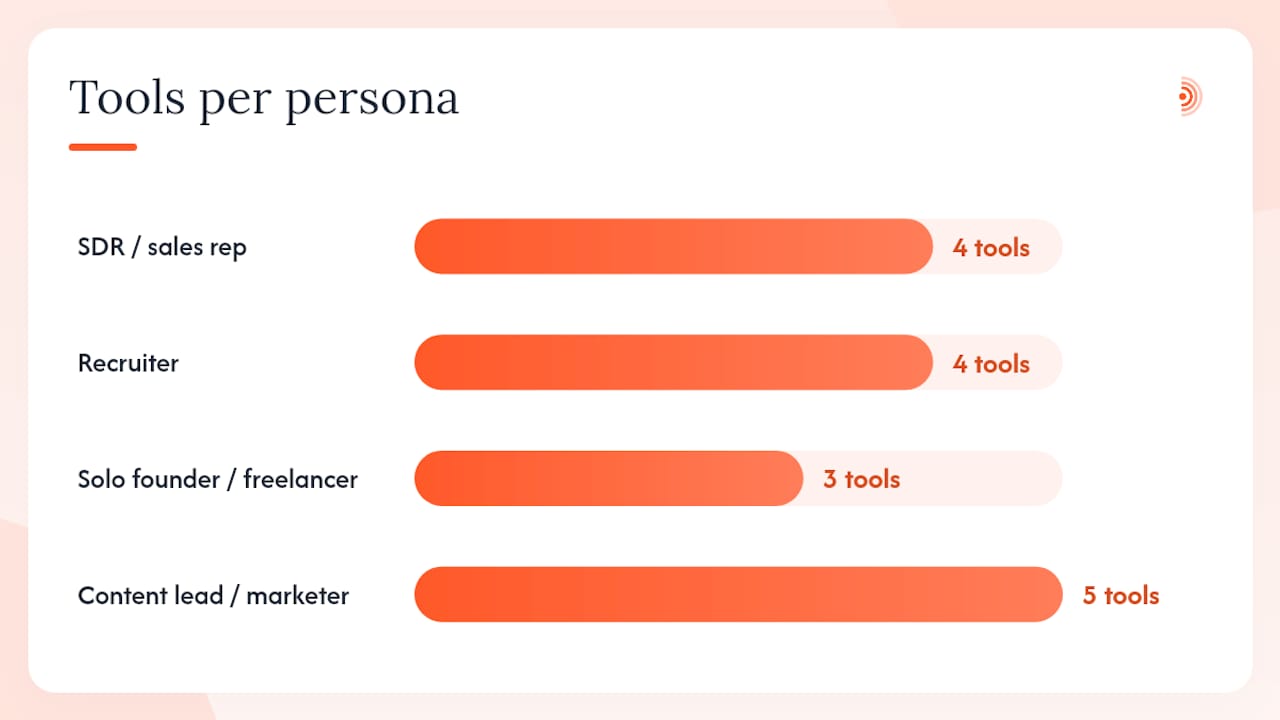
Persona-to-category mapping:
- SDR / sales rep: Start with an email finder (Apollo.io or Lusha) for enrichment, add Echoza for comment visibility, and consider PhantomBuster if you need click-triggered sequence automation.
- Recruiter: ContactOut or SignalHire for candidate contact data, folk for lightweight CRM, Crystal for tailored outreach messaging.
- Solo founder / freelancer: Echoza for visibility, Grammarly for message quality, News Feed Eradicator to stay focused.
- Content lead / marketer: AuthoredUp for post formatting, Taplio or Buffer for scheduling, Shield or Kleo for analytics.
Red flags to avoid:
- Extensions that request "read and change all data on all websites" with no clear reason
- Tools with no published privacy policy or data-handling documentation
- Fully automated posting or commenting with no approval step
- Extensions last updated more than 12 months ago
- Vendors who cannot explain where their contact data originates
Questions to ask during a free trial:
- Where does the contact data come from, and how often is it refreshed?
- What happens to my LinkedIn credentials if I revoke access?
- Does the credit model roll over, or do unused credits expire?
- How does CRM sync handle duplicate records?
According to Cleverly's B2B lead generation roundup, matching the tool to your primary goal before evaluating features is the single most effective selection filter. A great automation tool is useless if what you actually need is verified email addresses.
LinkedIn safety and policy: what automation tools can and cannot do safely
LinkedIn's terms of service prohibit automated actions that mimic human behavior, including automated connection requests, automated messaging, and automated posting. The platform uses behavioral signals, including action velocity, timing patterns, and session metadata, to detect non-human activity. Violations can result in temporary restrictions, permanent account bans, or removal from search results.
That said, not all extensions carry equal risk. The risk level depends almost entirely on whether the tool takes action autonomously or requires a human to approve and trigger each step.
What is generally safe:
- Read-only enrichment (surfacing contact data without taking any action)
- Draft-and-approve workflows where a human reviews and manually triggers each post or comment
- Click-triggered data collection where you initiate each action
- CRM sidebar tools that only read page content
- Grammar and formatting tools that operate entirely client-side
What carries meaningful risk:
- Automated connection requests sent without human review
- Scheduled posts or comments that publish without a final approval step
- Mass profile visits at speeds no human could replicate
- Extensions that log into your LinkedIn account via stored credentials rather than OAuth
What carries the highest risk:
- Fully automated commenting at scale (PowerIn and similar tools)
- Mass scraping of profiles or search results at high velocity
- Tools that bypass LinkedIn's API entirely using browser injection
For a detailed breakdown of account risk signals and how to spot early warning signs, the LinkedIn automation tool warning guide covers what to watch for.
Safety monitoring checklist:
- Watch for sudden drops in profile views or post reach after installing a new extension
- Check LinkedIn's "Account restrictions" page weekly when running any automation
- Set daily caps on every tool that supports them
- Revoke OAuth access for any extension you stop using
- Never run two automation tools simultaneously on the same account
Echoza's draft-and-approve model is specifically designed to stay on the safe side of this line. Comments are drafted by AI, reviewed by you, and scheduled across working hours with daily caps. Nothing posts without your explicit approval. For a practical guide on keeping comment automation within LinkedIn's acceptable use boundaries, see how to automate LinkedIn comments without getting banned.
Install and quick-start: set up safely in 10 minutes
- Open the Chrome Web Store and search for the extension by name. Check the developer name matches the official vendor, the review count is substantial, and the last update date is recent.
- Review the permissions screen before clicking "Add to Chrome." Normal permissions include "Read your browsing history on the current site" or "Read and change data on [specific domain]." Flag any request for "Read and change all data on all websites" and research why it is needed.
- Click "Add to Chrome" and confirm the installation. The extension icon appears in your toolbar.
- Sign in via OAuth when prompted. Prefer OAuth (the "Sign in with LinkedIn" button) over entering your LinkedIn password directly into a third-party tool.
- Set daily caps and limits immediately after first login. Most enrichment and automation tools have a settings panel for this. For comment tools like Echoza, set a daily comment limit that matches your normal human activity level.
- Run a safe test action on a profile you already know. For enrichment tools, verify one contact you can confirm. For comment tools, draft one comment, review it, and approve it manually.
Permissions to accept vs. flag:
- Normal: "Read page content on LinkedIn.com," "Store data locally," "Access your LinkedIn profile"
- Flag and research: "Read and change all data on all websites," "Access data on all sites," "Manage your downloads"
Rollback steps if something goes wrong:
- Click the puzzle icon in Chrome, find the extension, and click "Remove from Chrome"
- Go to LinkedIn Settings → Security → Permitted Services and revoke the extension's OAuth access
- Check your LinkedIn account for any unexpected activity in the past 24 hours
- If you see unusual connection requests or messages sent from your account, change your LinkedIn password immediately
Why Echoza is the pick for comment-driven visibility
Most LinkedIn extensions focus on extracting data or automating outreach. Echoza does something different: it puts you inside the conversations your prospects are already having, at scale, without the account risk of fully automated posting.
Core features:
- AI drafts comments in your voice, trained on your past activity and style preferences
- Every draft sits in an approval queue before anything posts
- Approved comments are scheduled across working hours, not blasted at once
- Voice profiles let you maintain separate tones for different clients or accounts
- Multi-account management from a single dashboard
- Daily activity caps prevent velocity spikes that trigger LinkedIn's risk systems
Safety model: The draft-and-approve workflow means LinkedIn never sees automated posting behavior. You remain the human in the loop. That distinction matters because LinkedIn's detection systems look for action patterns, not just volume.
Use-case fit:
- Sales reps: Show up in high-visibility posts your prospects engage with, building familiarity before a cold outreach
- Recruiters: Engage in industry conversations to attract passive candidates without spamming connection requests
- Marketers: Amplify content reach by commenting on trending posts in your niche
- Agencies: Manage multiple client LinkedIn accounts with separate voice profiles and approval queues
Echoza offers a 14-day free trial. Pricing details and plan tiers are available on the Echoza product page. For context on how comment activity affects LinkedIn's distribution algorithm, the LinkedIn dwell time guide explains the mechanics behind why comments drive profile visibility.
When comment automation beats cold outreach
The conventional wisdom in B2B sales is that outreach volume drives pipeline. Send more messages, book more meetings. That logic works at certain stages, but it breaks down when your prospects are already active on LinkedIn and your cold messages are competing with dozens of others landing in their inbox every week.
Comment automation serves a different purpose. When you consistently show up in the conversations your ideal clients are already having, you build familiarity before any direct outreach. A prospect who has seen your name and read your comments three times in the past month is not a cold contact anymore. That shift in context changes reply rates on subsequent outreach.
The cases where comments outperform cold messages: you have a modest posting cadence and want to amplify your presence without creating more content; you are nurturing a defined set of warm accounts where familiarity matters; you are building a personal brand in a niche where your prospects follow the same handful of thought leaders.
The cases where cold outreach is the right tool: targeted account acquisition where speed matters more than familiarity; direct hiring where you need a specific person with specific credentials and there is no time for a warm-up sequence; campaigns where the offer is strong enough to convert on first contact.
The real risk is over-relying on either channel. Comment automation without any direct outreach leaves pipeline on the table. Cold outreach without any warm-up context gets ignored. The professionals who get the best results from LinkedIn combine both, using comments to build the context that makes outreach land.
Echoza gets you visible on LinkedIn without the cold outreach grind
Sending 50 connection requests a day and hoping someone replies is one way to generate pipeline. Showing up in the conversations your prospects are already reading is another, and it compounds over time in a way that cold volume does not.
Echoza drafts comments in your voice, holds them for your review, and schedules approved comments across your working hours. You stay in control of every word that goes out. Your daily caps keep activity within normal human ranges. And because nothing posts without your approval, your LinkedIn account stays safe.
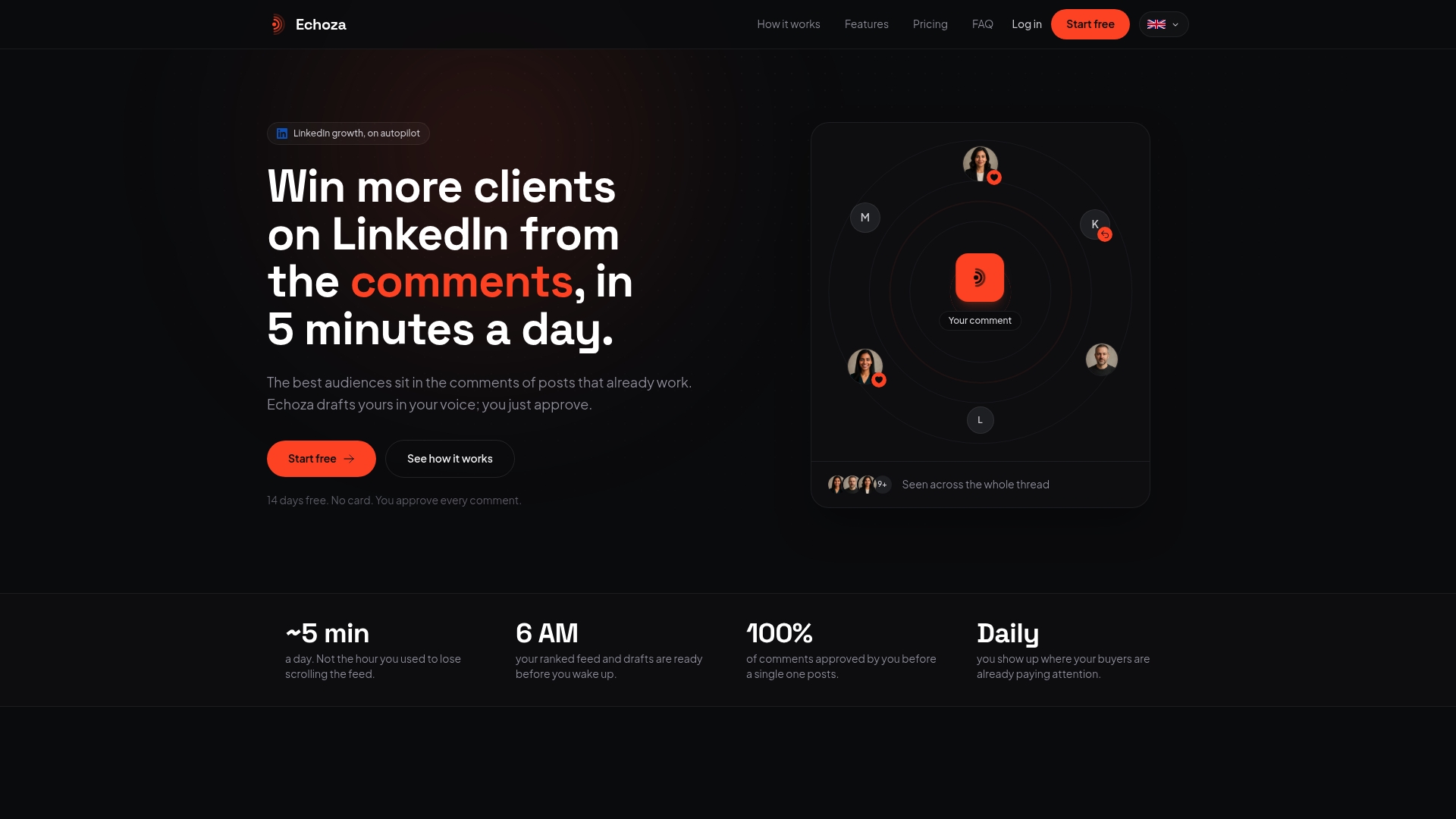
The 14-day free trial gives you enough time to see whether comment-driven visibility moves the needle for your specific audience. Start the trial at echoza.app, and if you want to understand how comments interact with LinkedIn's distribution algorithm before you begin, the LinkedIn dwell time guide is worth reading first.
Useful sources and links
Primary research references used in this article:
- Top 10 LinkedIn Chrome Extensions for B2B Lead Generation
- 14 Best LinkedIn® Chrome Extensions for 2026 | Reepl
- 2026’s Best LinkedIn Chrome Extensions for Sales Reps [Tested & Ranked] — PhantomBuster Blog
- Reepl - AI Comment & Reply Assistant for LinkedIn® and X - Chrome Web Store
- LinkedIn Extension - Chrome Web Store
Related Echoza resources:
- Top 5 LinkedIn lead generation tools
- LinkedIn outreach automation alternatives
- How to automate LinkedIn comments without getting banned
- LinkedIn automation tool warning signals
- Taplio alternatives for LinkedIn engagement
- Export your LinkedIn profile as a PDF — ResumeMint