

LinkedIn dwell time is the single most important passive signal for expanding post reach and driving profile discovery. The core lever: hold attention with a strong hook in your first three lines, then place yourself inside high-reach conversations using approval-first comment automation. Here are three micro-actions you can run in the next hour.
- Fix your hook now. Rewrite your next post's opening line so it creates a knowledge gap. Instead of "Here's what I learned about pricing," try "I lost a $40K contract because of one pricing mistake. Here's what I missed." The reader has to click "see more" to close that gap, and that click is what starts the dwell clock.
- Drop one approved comment. Find a post in your niche with 500+ reactions. Write a two-sentence insight comment that adds a specific data point or counterexample the original post missed. Post it during the 6:00–7:00 AM or 12:00–1:00 PM window when engagement rates peak.
- Set your schedule window. Block 15 minutes each morning to review and approve queued comments before they go live. Echoza's approval queue makes this the safest way to scale personalized commenting without risking your account.
Table of Contents
- What is LinkedIn dwell time, and how does it differ from likes?
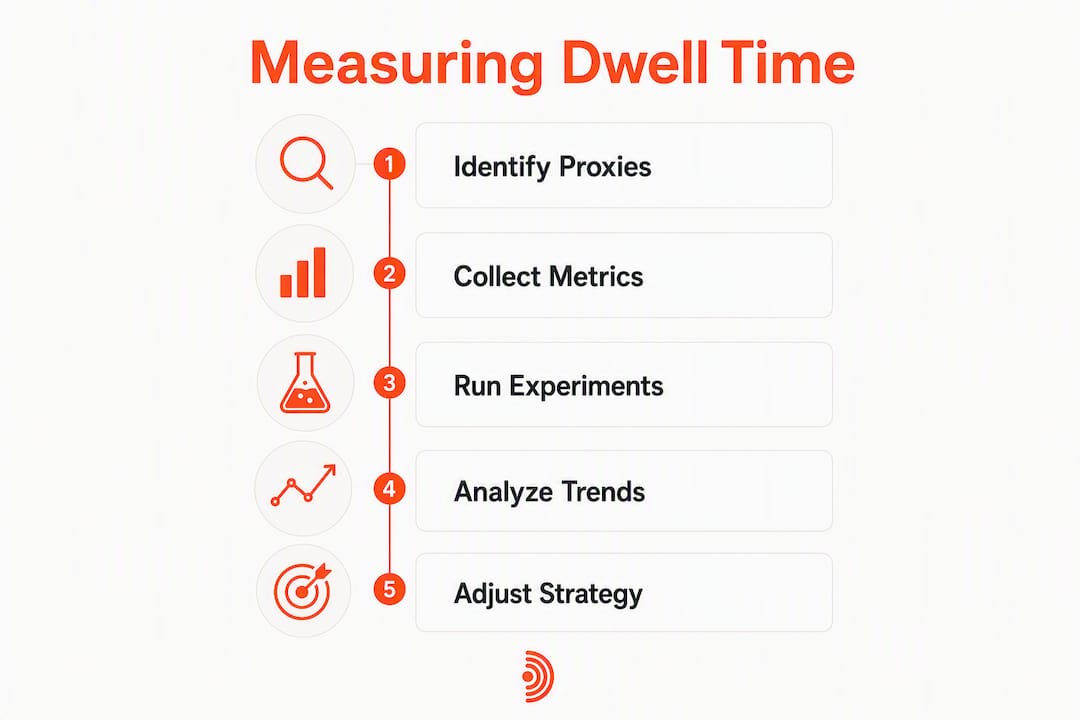
- How to measure dwell time indirectly using practical proxies
- A step-by-step playbook to increase dwell with high-value comments
- How to use comment automation safely without violating LinkedIn rules
- Which experiments to run and how to calculate ROI
- How Echoza operationalizes this playbook
- How to optimize your LinkedIn profile to hold visitors once they arrive
- Which content formats generate the most dwell time?
- How to balance automation with genuine interaction
- Key Takeaways
- Why the long game beats every growth hack on LinkedIn
- Echoza puts your commenting strategy on autopilot, safely
What is LinkedIn dwell time, and how does it differ from likes?
LinkedIn measures dwell time as the seconds a post stays visible in a member's viewport, collected passively on the client side. The platform normalizes that signal against feed position and content format, so performance is judged relative to what's expected for that specific slot, not against a universal threshold. Padding a post to run long does nothing; the algorithm is comparing you to similar content in similar positions.
What makes dwell genuinely useful as a signal is that it's involuntary and harder to game than a like. A like takes one tap. Dwell requires real attention.
| Signal | What it captures | Ease of gaming |
|---|---|---|
| Dwell time | Seconds of real attention per impression | Very hard |
| Likes | A single voluntary tap | Easy |
| Comments | Visible text response | Moderate |
Two behaviors compound dwell beyond a simple scroll-pause. First, a "see more" expansion triggers a separate, deeper reading session that adds significantly to the cumulative score. Second, video watch time accrues dwell with every second played. Re-views count too: when a reader returns to check a reply, that second session stacks on top of the first. This is why your first 2–3 lines carry disproportionate weight. They are the gate. A weak hook means the expansion never happens, and the algorithm discounts everything that follows.
How to measure dwell time indirectly using practical proxies
LinkedIn doesn't surface raw dwell figures in its analytics dashboard. You infer it from a cluster of proxy metrics tracked together over time.
| Proxy metric | What it signals | Where to find it |
|---|---|---|
| Impressions vs. engagement rate | Low engagement on high impressions = weak hook or poor dwell | LinkedIn native analytics |
| "See more" expansion rate | Direct behavioral proxy for dwell depth | Estimated from click data |
| Video watch time / finish rate | Completion rate correlates with dwell accrual | LinkedIn video analytics |
| Saves | Highest-intent dwell signal; implies re-read intent | LinkedIn native analytics |
| Profile views after posting | Downstream effect of strong dwell on a post | LinkedIn native analytics |
| Inbound messages / connection requests | Lagging indicator of dwell-driven recall | Manual tracking |
Run experiments on a 7/30/90-day cadence. At day 7, you're reading early signals: did impressions hold, did saves tick up? At day 30, you're looking for stabilization: is the engagement-to-impression ratio improving across post types? At day 90, you're measuring recall: are inbound messages and profile views trending up week over week? Log every test with format, hook text, comment variant, time posted, and the early-hour engagement window data. Without that log, you're guessing.
Pro Tip: Track LinkedIn metrics in a simple spreadsheet: one row per post, columns for format, character count, hook type, saves, profile views, and inbound messages that week. After 30 days, patterns become obvious.
A step-by-step playbook to increase dwell with high-value comments
The sequence is straightforward: find a high-reach post in your niche, craft a value-first comment, get it approved, post it in the right window, then follow the thread.

Finding the right posts means targeting content with strong early traction, ideally 200+ reactions within the first two hours. Those posts are already getting distribution; your comment rides that wave.
Three comment templates to adapt:
Insight comment: "The point about [X] is underrated. In my experience working with [specific context], the real bottleneck is [specific insight]. Most people skip this step and wonder why [outcome]."
Question comment: "Curious whether you've seen this hold in [specific scenario]. I've noticed [observation] when [condition]. Does the same pattern apply here?"
Micro-case comment: "We ran this exact approach with [type of client/project]. The result: [specific, concrete outcome]. The variable that made the difference was [specific detail]."
Each template adds something the original post didn't say. That's the point. A comment that just agrees is invisible. A comment that extends the conversation pulls readers into the thread, and reading comments counts toward dwell time on the original post.
Hook threading is the advanced version. Drop a first comment that opens a micro-story ("The first time I tried this, it failed completely. Here's why."), then reply to yourself 30–60 minutes later with the resolution. Each reply draws readers back into the thread, adding a new dwell session without triggering spam signals.
On post length: studies suggest that posts under 400 characters rarely beat baseline engagement, while posts over 2,000 characters often do so more frequently. The 600–1,200 character range tends to hit the sweet spot for many audiences because it reliably triggers "see more" without overwhelming readers.
Pro Tip: Structure every post with the 3-2-1 framework: 3 lines to build the hook, 2 substantive insights behind "see more," 1 direct question at the end to drive comment threads. This structure maximizes engagement at every stage of the dwell cycle.
How to use comment automation safely without violating LinkedIn rules
LinkedIn's stance is clear: spammy, repetitive behavior gets flagged. Approval-first automation is safer precisely because a human reviews every comment before it posts, which preserves authenticity and catches anything that reads generic.
Do:
- Review and edit every drafted comment before approving it
- Vary the posts you engage with across topics, authors, and formats
- Apply daily activity caps (a conservative limit keeps patterns looking human)
- Tailor each comment to the specific post's argument, not just its topic
Don't:
- Copy-paste the same comment across multiple threads
- Send automated DMs that mirror your comment content
- Engage the same account repeatedly in unrelated threads
- Approve comments in bulk without reading them
Operational safety checklist:
- Approval workflow active before any comment posts
- Daily cap set and respected (start conservatively, increase gradually)
- Comment diversity confirmed across post types and authors each week
- Human fallback protocol in place for sensitive or controversial threads
For a deeper look at where automation risks actually live, the LinkedIn automation warning guide covers the specific patterns that trigger platform review.
Pro Tip: If a drafted comment feels even slightly off-tone, rewrite it before approving. The approval step exists for exactly this reason. One generic comment in a high-visibility thread can undo weeks of credibility-building.
Which experiments to run and how to calculate ROI
Set up a simple A/B structure: control weeks with no automated comments, treatment weeks with approved automated comments on 3–5 high-reach posts per day. Keep everything else constant: post format, posting time, hook structure.
| KPI | Measurement method | Target signal |
|---|---|---|
| Impressions change | LinkedIn analytics week-over-week | Upward trend in treatment weeks |
| Profile views | LinkedIn analytics, weekly total | Lift vs. control baseline |
| Inbound messages | Manual count, weekly | Increase over 90-day period |
| Connection requests | LinkedIn analytics | Steady growth, not spike-and-drop |
| Saves per post | LinkedIn analytics | Rising saves = rising dwell proxy |
For ROI: take your monthly subscription cost, divide it by the incremental profile views generated in treatment weeks versus control weeks. That gives you cost per incremental profile view. Do the same for inbound messages to get cost per inbound lead. Most users find the 90-day timeline is where the ROI case becomes clear, because about 95% of target buyers aren't purchase-ready immediately. Dwell-focused outreach builds the recall that converts later.
How Echoza operationalizes this playbook
Echoza is built specifically for this workflow. It ranks your feed to surface high-reach posts worth engaging, drafts comments in your voice based on your past writing and style, queues them for your review, schedules approved comments across working hours, and applies daily activity caps automatically. Multi-account support means agencies and teams can run this across several LinkedIn profiles without managing separate workflows.
The five-step user workflow looks like this. First, Echoza surfaces relevant high-reach posts from your feed each morning. Second, it drafts a personalized comment for each, matching your tone and adding a specific insight. Third, you review the queue, edit anything that needs adjustment, and approve. Fourth, Echoza schedules the approved comments across your working hours, avoiding burst patterns. Fifth, you monitor the thread and follow up manually when a reply warrants a deeper conversation.
"Since using Echoza's approval-first workflow, my profile views increased noticeably within the first month, and I started receiving inbound messages from prospects who had seen my comments before ever visiting my profile." — Echoza user, reported outcome
Pro Tip: Use Echoza's voice profile feature to upload a sample of your best past comments and posts. The drafts it generates will sound like you wrote them at your best, not like a bot wrote them at 2 AM.
How to optimize your LinkedIn profile to hold visitors once they arrive
Getting someone to click your profile after seeing your comment is half the battle. Keeping them there long enough to act is the other half.
Your banner image and headline are the first things a visitor sees. The headline should state a specific outcome you deliver, not your job title. "I help SaaS founders close enterprise deals faster" holds attention longer than "Senior Account Executive at Company X."
Your About section needs its own hook. The first two lines show before "see more" on mobile. Write them to create the same curiosity gap you'd use in a post. Then deliver the substance: specific results, named clients or industries, and a clear call to action at the end.
Featured posts and articles extend dwell on your profile itself. Pin your highest-performing post, a case study, or a lead magnet. Visitors who click a featured item spend significantly more time on your profile than those who don't. Pair this with a profile optimization approach that treats every section as a dwell opportunity, not just a resume entry.
Which content formats generate the most dwell time?
Carousels (document posts) generate the longest dwell of any format because each slide requires an active swipe. A 7–12 slide carousel keeps readers engaged far longer than a static image. Design each slide to end on an incomplete thought so the reader has to swipe to resolve it.
Videos work differently. Completion rate is the metric that matters: a 30-second video watched fully outperforms a 3-minute video watched for 20 seconds. Hook the viewer in the first 2 seconds, deliver the core value by second 10, and keep the total under 90 seconds for most professional topics.
Long-form text posts reward specificity. The 2026 study data showing posts over 2,000 characters beat baseline 59% of the time holds only when the content is specific and emotionally resonant. A long post that meanders loses readers faster than a short one that's tight.
Articles generate the lowest feed dwell but the highest post-click dwell. Use them for deep-dive content you want to rank in LinkedIn search, and promote them through comments on related posts to drive traffic.
How to balance automation with genuine interaction
Automation scales your voice; it doesn't replace your judgment. The practical rule: automate the drafting and scheduling, but keep the thinking human.
Reserve your manual commenting time for three situations: threads where you have a genuinely unique perspective that the drafted comment didn't capture, replies to people who responded to your automated comment, and posts from key relationships where a generic comment would damage trust.
The ratio that works for most users is roughly 70% approved-automated comments on discovery posts and 30% fully manual comments on relationship-critical threads. This keeps your activity volume high enough to build recall while preserving the authentic interactions that convert followers into clients.
Consistent community conversation over time outperforms any growth hack. The readers who see your comment three times across three different posts in one week will remember your name when they need what you offer.
Key Takeaways
Dwell time is LinkedIn's strongest passive signal, and the fastest way to lift it is combining a curiosity-gap hook with consistent, approved, high-value comments placed inside high-reach conversations.
| Point | Details |
|---|---|
| Fix your hook first | Rewrite your first 3 lines to create a knowledge gap that forces a "see more" click. |
| One approved comment daily | Start with several approved comments per day on high-reach posts; use daily caps from day one. |
| Measure with proxies | Track saves, profile views, and inbound messages weekly; run a 30-day experiment before drawing conclusions. |
| Respect the 90-day timeline | Most buyers need repeated exposure; dwell builds recall over weeks, not days. |
| Use Echoza's approval queue | Echoza drafts, queues, and schedules comments in your voice so every post goes through human review before it goes live. |
Why the long game beats every growth hack on LinkedIn
The conventional wisdom says post more, engage more, optimize the algorithm. What that advice misses is that LinkedIn's feed is a trust-building environment, not a broadcast channel. The accounts that win over 12 months aren't the ones that gamed a viral post in January. They're the ones whose names kept appearing in the right conversations, consistently, with something worth reading.
Automation used well is voice-scaling, not voice-replacing. When Echoza drafts a comment that sounds like you at your most articulate, and you approve it before it posts, you're not outsourcing your thinking. You're removing the friction that stops most people from showing up consistently. The discipline is in the review step, not the drafting step.
Document your results. Every 30 days, pull your proxy metrics, compare treatment weeks to control weeks, and write one sentence about what changed. That log becomes the evidence base for every future decision about what to post, where to comment, and how to allocate your time on the platform.
Echoza puts your commenting strategy on autopilot, safely
Most LinkedIn users know they should comment more. The real problem is consistency: drafting a thoughtful, on-brand comment for five different posts every morning takes time most people don't have.
Echoza solves exactly that. It surfaces the high-reach posts worth engaging, drafts personalized comments in your voice, and holds every one in an approval queue until you say go. You review, edit if needed, approve, and Echoza schedules the comment across your working hours with daily caps applied automatically. No burst patterns. No generic copy-paste. No risk of posting something off-brand at the wrong moment.
The result users report: more profile views, more inbound messages, and a LinkedIn presence that compounds over time without requiring hours of daily manual effort.
Start with a free trial at Echoza and run your first 14 days with the approval queue active and daily caps set conservatively. That's the safest way to see what approval-first comment automation actually does for your visibility before committing to a paid plan.