

What does a LinkedIn automation tool warning actually mean?
A LinkedIn automation tool warning is a direct alert from LinkedIn's security systems telling you that your account activity looks like it came from a bot, a script, or unauthorized third-party software. The warning does not confirm you were using automation. It confirms LinkedIn's algorithms flagged your behavior as suspicious enough to warrant a notice.
The message itself usually reads something like: "We noticed activity from your account that indicates you MIGHT be using an automation tool. This can SOMETIMES be caused by browser extensions or third-party applications that run in the background." That language is deliberate. LinkedIn is not accusing you outright. It is putting you on notice.
What makes this warning significant is what comes next if you ignore it. LinkedIn's User Agreement explicitly prohibits automated software, and the platform treats repeated flagged behavior as escalating violations. A warning is the first rung on a ladder that ends in a permanent ban.
Common warning messages users encounter include:
- "Important notice from LinkedIn" — the standard automation detection alert
- "We've restricted your account temporarily" — signals feature-level blocking
- "You're visiting too many profiles" — triggered by rapid profile browsing
- "You've reached the weekly invitation limit" — hits after exceeding connection caps
- "Something isn't quite right" — appears after unusual activity patterns
Genuine users trigger these warnings more often than most people expect. Opening multiple profiles in new tabs, logging in from a hotel Wi-Fi, or sending the same message to ten people in an afternoon can all set off the same alarm that catches actual bots.
Common causes of LinkedIn automation warnings
LinkedIn's detection system does not distinguish between intent and behavior. It reads patterns. If your pattern looks automated, you get flagged, regardless of whether you touched a tool.

The most common triggers fall into two categories: tool-based and manual.
Tool-based triggers:
- Sending bulk connection requests or messages through third-party software
- Using browser extensions that inject code into LinkedIn's interface or extract profile data
- Running scraping scripts that pull large volumes of profiles without filters
- Accessing LinkedIn through headless browsers or spoofed user agents
- Sharing your LinkedIn credentials with a tool or a third party
Manual triggers that mimic automation:
- Opening dozens of profiles simultaneously using "open in new tab"
- Sending the same message text to multiple people, even manually
- Logging in from multiple IP addresses or devices in a short window
- Clicking through profiles directly from Google search results at high speed
- Having thousands of unanswered pending connection requests sitting on your account
The risk scales with volume and velocity. A commercial use limit governs how many profiles you can search and view before LinkedIn flags the activity as commercial scraping. Premium accounts get higher thresholds, but no account type is immune.
Pro Tip: Vary the timing and volume of your LinkedIn activity day to day. Humans are inconsistent by nature. If your activity pattern is perfectly uniform — same number of actions, same time each day — LinkedIn's algorithms will notice before you do.
How LinkedIn detects automated activity
LinkedIn does not rely on a single tripwire. Its detection is layered, and no single action causes a ban. It is an accumulation of signals that tips the scale.
LinkedIn's machine learning models analyze behavioral patterns, timing, content relevance, and device and location consistency simultaneously. Identical intervals between actions, sessions that run 24/7 with zero natural pauses, and activity that never deviates from a set pattern are all behavioral fingerprints the system flags almost immediately.
Beyond behavior analysis, LinkedIn monitors:
- Velocity and timing: Sending 200 connection requests in a single day, or browsing many profiles very quickly, produces a pattern no human could replicate naturally.
- Browser fingerprinting: Automation tools often use headless browsers or spoof user agents. LinkedIn's JavaScript analysis detects missing browser signatures and DOM manipulation patterns that do not match native platform behavior.
- IP and geographic anomalies: Rapid IP changes or multiple accounts originating from the same IP address raise immediate flags.
- Honeypots: LinkedIn deploys fake profiles designed specifically to trap automation tools. Only bots interact with them, so any account that does gets flagged instantly.
- Negative feedback from recipients: When prospects mark your outreach as spam or select "I don't know this person" on a connection request, those signals feed directly into LinkedIn's risk scoring for your account.
LinkedIn blocked or removed a very large number of fake accounts in recent years, which reflects the scale of its enforcement infrastructure. The system is not passive.
Risks and consequences of receiving a LinkedIn automation warning
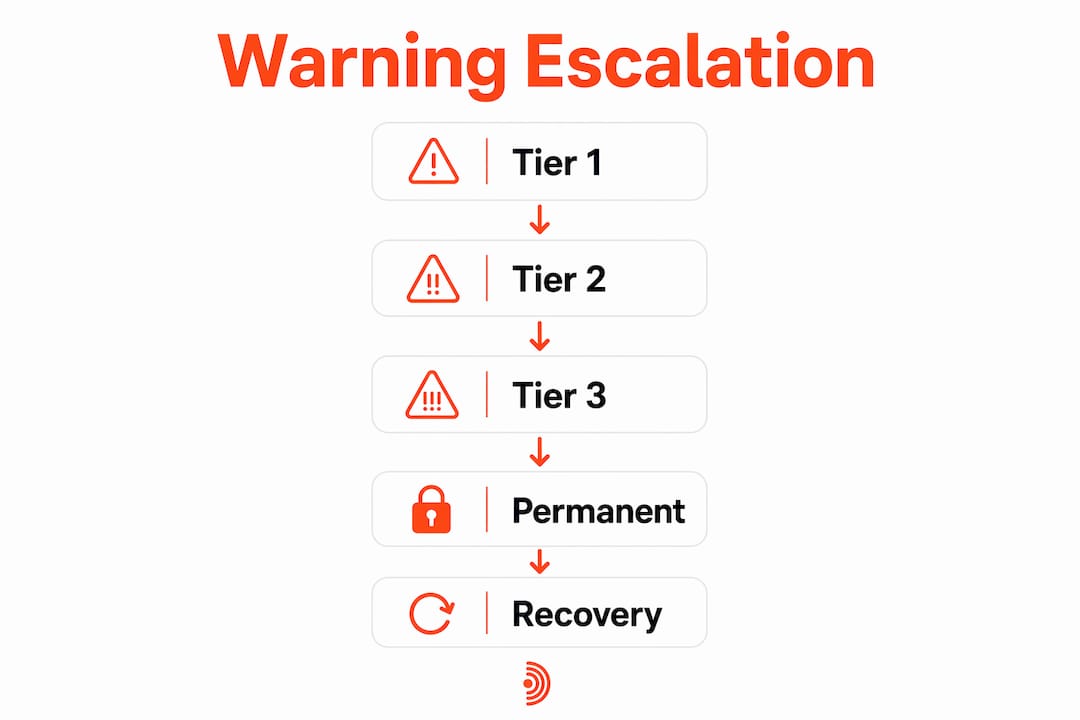
Ignoring a warning does not make it go away. LinkedIn operates a tiered enforcement system, and each ignored signal moves you up the ladder.

Tier 1 restrictions temporarily disable specific features for 1–24 hours. You can still log in, but connection requests or messaging may be blocked.
Tier 2 locks your account for 3–14 days and requires identity verification, typically uploading a government-issued ID, before access is restored.
Tier 3 is a permanent ban. Recovery success rates for permanent bans are generally low even with appeals. A permanent ban means losing your entire network, every connection history, and every active conversation in your pipeline.
Beyond the tiered bans, users face additional consequences:
- Shadowbanning: LinkedIn suppresses your content without issuing a formal notice. Your posts reach far fewer people, and you have no direct way to confirm it is happening.
- IP blacklisting: After a Tier 3 ban, LinkedIn can blacklist the IP address, blocking new account creation from the same network.
- Reduced profile visibility: Even a Tier 1 restriction can suppress your profile in search results during the restriction window.
- Loss of Sales Navigator data: Paid account data and saved lead lists can be inaccessible or permanently lost after a ban.
The escalation path moves fast. The first warning appears as limited feature access. The second requires immediate verification. The third results in permanent account loss. Treating the first warning as a minor inconvenience is the mistake that leads to the third.
How to avoid LinkedIn automation warnings while staying active
Staying active on LinkedIn without triggering warnings comes down to one principle: make your activity look like a person did it, because a person should be doing it.
Volume control:
- Keep weekly connection requests under 100 per week. LinkedIn sets this as a hard cap, and hitting it repeatedly accelerates restriction risk.
- Cap daily messages at 50 for free accounts, 75 for Premium, and 250 for Sales Navigator.
- Limit profile views to roughly 80 per day on standard accounts.
Behavioral patterns:
- Add randomized delays of 30–60 seconds between actions rather than running them in rapid succession.
- Avoid running any tool or outreach sequence continuously. Take natural breaks.
- Withdraw pending connection requests older than 3–4 weeks. A large pile of unanswered requests signals low-quality outreach to LinkedIn's system.
Account hygiene:
- Run automation from a consistent browser and IP address. Switching setups frequently triggers geographic anomaly detection.
- Audit every browser extension that touches LinkedIn. If it can send messages, view profiles, or extract data automatically, it is a liability.
- Warm up new accounts with at least two weeks of manual-only activity before introducing any automation, then ramp volume gradually over four weeks.
Pro Tip: Personalize every message you send, even manually. Generic, identical messages sent to multiple people are one of the fastest spam signals LinkedIn's system picks up, and recipients who mark them as irrelevant compound the risk.
What recent research reveals about LinkedIn's detection in 2026
LinkedIn's enforcement posture has shifted significantly in the past two years. Detection rates increased 340% between 2023 and 2025, and the tools that worked safely 18 months ago now trigger instant restrictions after algorithm updates.
Several widely held assumptions about automation safety are simply wrong in 2026:
- "Cloud-based tools are safe." Cloud-based automation carries less risk than browser extensions, but it is not immune. LinkedIn's algorithms adapt to new patterns quickly, and cloud tools that operated without issue last year may now trigger alerts.
- "Staying under the limits guarantees safety." Volume is one signal among many. Negative feedback from recipients can escalate account risk regardless of how carefully you pace your sending.
- "Manual high-volume activity is always fine." Testing across 50 accounts showed a 23% restriction rate within 90 days when using automation tools, but manual activity that mimics automation patterns produces similar flags.
- "A warning is just a warning." LinkedIn's layered detection accumulates signals. A warning means the system already has you flagged, not that you are starting from zero.
The bot problem on LinkedIn also creates collateral damage for legitimate users. Fake accounts and phishing bots target job seekers with sophisticated, personalized messages, which forces LinkedIn to calibrate its anti-fraud algorithms aggressively. Some content creators have been banned due to false positives as a direct result of that calibration. The system is not perfect, and legitimate users pay the price when it overcorrects.
How automation tool types differ in their risk levels
Not all automation tools carry the same risk. The architecture of a tool determines how visible it is to LinkedIn's detection systems.
Browser extensions sit at the highest risk level. They inject code directly into LinkedIn's interface, leave forensic traces including missing browser signatures and unusual API call sequences, and are explicitly named in LinkedIn's prohibition on "headless browsers or detectable Chrome extensions." Any extension that can send messages, view profiles automatically, or extract data is a direct violation.
Desktop applications that simulate mouse clicks and keystrokes carry moderate-to-high risk. They operate outside the browser but still generate activity patterns that LinkedIn's velocity monitoring picks up, especially if they run on fixed schedules.
Cloud-based platforms present lower but real risk. Because they operate from external servers rather than your browser, they avoid some fingerprinting detection. However, they still generate IP anomalies if they do not route through consistent, dedicated proxies, and their activity patterns remain subject to velocity and timing analysis.
API-compliant tools that operate within LinkedIn's official API guidelines carry the lowest risk, but LinkedIn's official API is heavily restricted for most use cases. Most tools marketed as "API-based" are not using the official API.
The safest approach for LinkedIn lead generation is to use tools that operate within human-like limits, apply randomized delays, and do not require your login credentials or cookie access. Tools that need your LinkedIn session token are accessing the platform as you, which means any violation they commit is attributed directly to your account.
What happens to accounts that get restricted: real patterns
The pattern of restriction and recovery follows a predictable arc, and understanding it helps you respond correctly if it happens to you.
Accounts that receive a first warning and immediately pause all automation typically recover within 24–48 hours at the Tier 1 level. The key is stopping everything before LinkedIn escalates. Continuing to use the tool after a warning, or logging in repeatedly during a restriction window, is what pushes a temporary block into a Tier 2 lockout.
Tier 2 cases require identity verification. In 2026, LinkedIn commonly requests a driver's license or passport upload to unlock a restricted account. Users who complete verification promptly and then demonstrate compliant behavior for several weeks before resuming outreach have the best recovery outcomes.
For accounts that reach Tier 3, the recovery path requires pausing all automation, completing identity verification, waiting at least 48 hours before attempting to log back in, and then submitting an appeal through LinkedIn's official channel. The appeal should be polite and concise. Admitting to automation use in the appeal is one of the fastest ways to confirm the ban.
Forum reports and user communities consistently describe the same mistake: creating a new account from the same IP address after a ban. LinkedIn traces the new account back to the blacklisted IP and bans it within days. If you need to start fresh, you need a genuinely different network connection, not just a different email address.
The broader lesson from these patterns is that the automation alternatives that survive long-term are the ones built around engagement rather than volume. Commenting on high-reach posts, contributing to active discussions, and building visibility through genuine interaction does not trigger velocity flags because it does not look like a bot. It looks like a person who has something to say.
Key Takeaways
LinkedIn automation warnings are serious alerts that escalate fast, and the 340% increase in detection rates between 2023 and 2025 means the tools and tactics that felt safe last year may already be putting your account at risk.
| Point | Details |
|---|---|
| Warnings escalate quickly | Tier 1 blocks features for 1–24 hours; Tier 3 permanent bans have recovery success rates below 15%. |
| Manual activity can trigger flags | Sending identical messages or browsing profiles rapidly mimics bot behavior even without tools. |
| Weekly connection cap is 100 | Exceeding 100 connection requests per week is a hard trigger for warnings and restrictions. |
| Detection increased 340% | LinkedIn's detection rates rose 340% between 2023 and 2025, making older safe tactics now risky. |
| Engagement beats volume | Comment-based visibility avoids velocity flags and builds authentic reach without restriction risk. |
Echoza keeps you visible without the risk
Most LinkedIn automation warnings come from tools that act on your behalf at scale, sending requests, scraping profiles, and blasting messages until LinkedIn's system catches up. Echoza takes a different approach entirely.
Echoza drafts personalized comments in your voice, places them inside high-reach discussions where your audience is already active, and holds every comment for your review before anything goes live. No bulk sending. No credential sharing. No velocity spikes. You stay in control of every action, which means LinkedIn sees a real person engaging thoughtfully, not a bot running a sequence.
For LinkedIn users who want consistent visibility and client outreach without the constant risk of account restrictions, Echoza is built for exactly that. Start your free trial and see how comment-driven engagement compounds over time.