

If you're searching for Sprout Social alternatives to handle LinkedIn commenting, Echoza is the pick. It drafts comments in your voice, holds every post for your approval before anything goes live, and applies daily activity caps that keep your account inside LinkedIn's policy lines. No other approach in this category combines all three controls in one tool.
Three reasons this matters right now:
- The LinkedIn User Agreement explicitly prohibits bots and unauthorized automated methods for commenting, and requires that AI-generated content be reviewed by the member before sharing.
- LinkedIn's developer AI policy requires edit-before-post controls and restricts automated posting of AI-generated content without end-user involvement.
- Users of context-aware AI comment workflows with manual approval report up to 7x more profile visitors and more than 13 hours saved per week, according to vendor-reported data.
Table of Contents
- What are the best Sprout Social alternatives for LinkedIn commenting?
- How do you choose the right LinkedIn commenting tool?
- What LinkedIn rules actually govern AI-powered commenting?
- Which features actually drive more profile views and inbound leads?
- Why Echoza is the recommended pick among these alternatives
- Key Takeaways
- The only sustainable LinkedIn commenting strategy is a slow one
- Echoza turns LinkedIn comments into a client pipeline
- Useful sources and further reading
What are the best Sprout Social alternatives for LinkedIn commenting?
The real question here isn't about multi-platform scheduling suites. If you're a freelancer, creator, or small agency team trying to grow on LinkedIn through personalized commenting, you need a tool built for that specific job. Here's how the main approaches stack up.
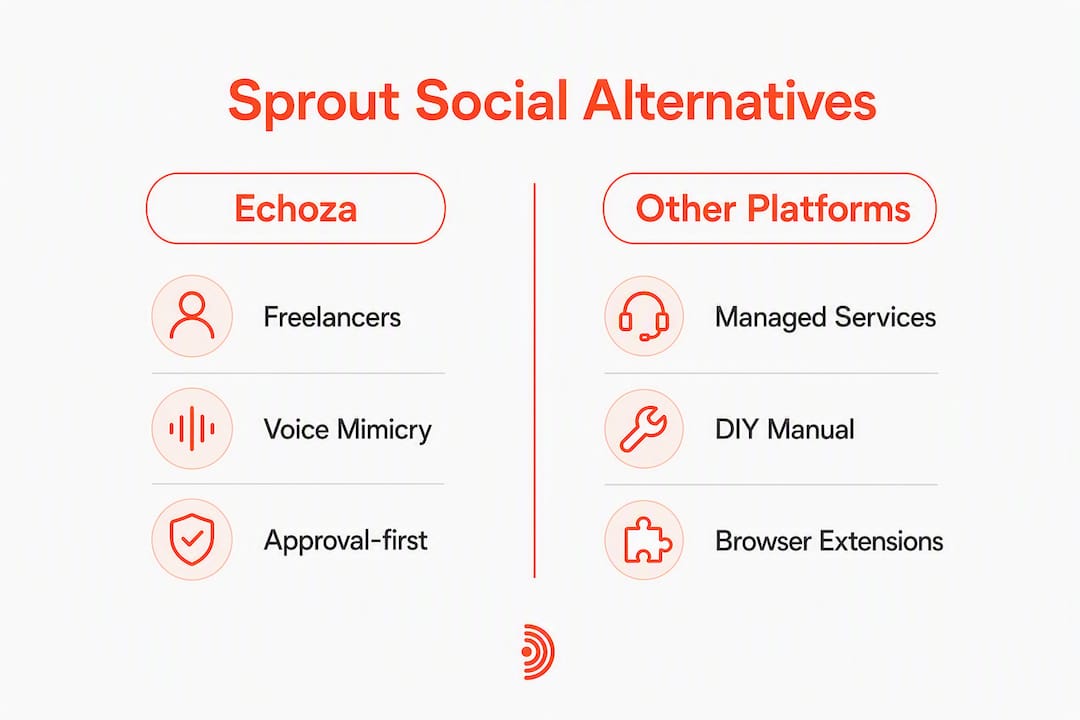
Echoza is the recommended choice. It reads post context, drafts a comment in your voice, and waits for you to approve before posting. It supports multiple LinkedIn accounts and voice profiles, schedules approved comments across working hours, and runs on cloud infrastructure with consistent IP assignment. That combination covers every compliance control LinkedIn's policy requires.
Beyond Echoza, four other approaches exist:
- Cloud-based engagement agents: — Fully automated comment bots that post without human review. High output, high risk. LinkedIn's User Agreement prohibits this pattern directly.
| Dimension | Echoza | Approval-first platforms | Managed services | DIY + manual |
|---|---|---|---|---|
| Best for | Freelancers, creators, agency teams | Solo professionals | High-budget teams | Lowest-volume users |
| Personalization | Voice mimicry from your style | Template-based | Human-written | Fully custom |
| Approval workflow | Mandatory user approval | Varies by tool | Human-managed | Always manual |
| Compliance risk | Low (approval + caps) | Medium | Medium (depends on vendor) | Minimal |
| Multi-account support | Yes | Rarely | Yes (at cost) | Manual only |
| Scheduling & caps | Built-in, daily caps | Limited | Manual | None |
| Pricing/trial | Free trial, tiered SaaS | Varies | High retainer | Free |
| Ease of setup | Browser extension + cloud | Moderate | Onboarding required | Immediate |
For a broader look at LinkedIn outreach automation categories and how commenting-first differs from connection-first strategies, Echoza's blog covers the distinction in detail.
How do you choose the right LinkedIn commenting tool?
Before you commit to any tool, run through this checklist. It maps directly to the compliance and outcome dimensions that separate safe tools from risky ones.
- Personalization: — Does the tool read the actual post content before drafting? Can it learn your writing style from past comments or posts?
- Data handling: — Does the vendor publish a clear privacy policy covering how your LinkedIn session data is stored and used?
What to test in a demo: Ask the vendor to show you a live comment draft from a real post, the approval queue, how voice profiles work across multiple accounts, and where activity logs are stored.
Red flags to walk away from: No approval step required, browser-extension-only automation with no cloud option, and no published data handling policy.

Pro Tip: Run your first week on a secondary LinkedIn account or a low-stakes profile before activating on your primary. This gives you a safe window to test the approval flow, tune your voice profile, and confirm the daily caps are working before any real audience sees the output.
What LinkedIn rules actually govern AI-powered commenting?
LinkedIn draws a clear line: AI-generated drafts that a human reviews before posting are acceptable. Fully automated actions posted without user review are prohibited. That distinction comes directly from the LinkedIn User Agreement, which lists using bots or unauthorized automated methods to comment among explicitly forbidden actions.
The developer AI policy reinforces this with specific design requirements: edit-before-post controls, explicit AI labeling, internal accountability, and channels for user feedback. Any tool that skips the edit step is built against these requirements, not with them.
Common triggers for an "Important notice from LinkedIn" include automated reactions or comments, browser extensions accessing session cookies, and sudden velocity spikes in activity. IP hopping (logging in from multiple locations in a short window) is another documented trigger.
Safe operational controls that reduce this risk:
- Draft-only mode with mandatory approval before any post goes live
- Daily caps set conservatively, especially in the first 30 days
- Cloud-based runs with a consistent, fixed IP address
- Single-tool strategy (running two automation tools simultaneously multiplies detection risk)
- Normal manual LinkedIn activity alongside any automation
If you receive a restriction notice, follow this sequence: pause or revoke tool access immediately, sign out of all active LinkedIn sessions, clear cached session data, then submit a concise appeal explaining the situation. Resuming automation while restricted extends the lock. For a full walkthrough, the PhantomBuster recovery guide covers each step in detail.
Pro Tip: Set a weekly calendar reminder to check your LinkedIn notification inbox and SSI (Social Selling Index) score. A sudden SSI drop or an unread policy notice caught early is far easier to address than one discovered after a week of continued automation.
For more on reading LinkedIn warning notices and what specific tool behaviors trigger them, Echoza's compliance blog breaks down the signals.
Which features actually drive more profile views and inbound leads?
The features that move the needle aren't the flashiest ones. They're the controls that make comments feel human and keep your account healthy long enough to see results.
Core features ranked by outcome impact:
| Feature | Primary benefit | Risk it controls |
|---|---|---|
| Contextual AI (reads post before drafting) | Comments that fit the conversation | Generic-comment detection |
| Voice mimicry / style learning | Consistent personal brand | Impersonation / off-brand posts |
| Mandatory approval workflow | Policy compliance | Unauthorized automated posting |
| Scheduling in golden-hour windows | Higher engagement per comment | Velocity spikes from off-hours bursts |
| Daily caps and pacing controls | Sustainable account health | Restriction triggers |
| Multi-account / voice profiles | Agency and team scalability | Cross-account policy exposure |
| Activity logs and audit trails | Accountability and debugging | No visibility into what posted |
| Cloud infrastructure + fixed IP | Consistent session identity | IP-hopping detection |
Vendor-reported data suggests context-aware AI comment workflows with manual approval can produce up to 7x more profile visitors and more than 13 hours saved per week compared to manual commenting. Treat those figures as directional benchmarks, not guarantees. Realistic timelines for measurable profile view increases run 3–6 weeks from a properly configured pilot.
For guidance on converting those profile visitors into leads, your profile itself needs to be optimized before you scale comment volume.
Why Echoza is the recommended pick among these alternatives
Echoza is built specifically for the job this article is about: personalized LinkedIn commenting at scale, with every compliance control built into the core workflow rather than bolted on as an afterthought.
What Echoza delivers:
- AI drafts comments by reading the post context and learning your writing style from past activity
- Every comment sits in an approval queue until you review and confirm it
- Approved comments are scheduled across working hours with daily caps you control
- Multiple LinkedIn accounts and voice profiles are supported, making it practical for agency teams managing several clients
- Cloud-based infrastructure with consistent IP assignment reduces detection risk versus local browser-extension-only tools
- Activity logs give you a full audit trail of what was drafted, approved, and posted
Echoza mapped to comparison dimensions:
| Dimension | Echoza |
|---|---|
| Best for | Freelancers, creators, small agencies |
| Personalization | Voice mimicry from your style and past activity |
| Approval workflow | Mandatory before every post |
| Compliance risk | Low |
| Multi-account support | Yes, with voice profiles per account |
| Scheduling & caps | Built-in, user-controlled daily limits |
| Pricing / trial | 14-day free trial, tiered monthly plans |
| Ease of setup | Browser extension + cloud, quick onboarding |
Echoza's model maps directly to LinkedIn's policy requirements: AI drafts that a human reviews before sharing, pacing controls that prevent velocity spikes, and cloud runs that maintain a consistent session identity. The step-by-step guide to automating LinkedIn comments safely on Echoza's blog covers the full pilot setup.
Key Takeaways
Echoza is the strongest compliance-first pick for AI-assisted LinkedIn commenting because it combines mandatory approval, voice personalization, daily caps, and cloud infrastructure in one tool.
| Point | Details |
|---|---|
| Start with a safe pilot | Run 10–35 comments per day for 7–14 days before increasing volume. |
| Approval workflow is non-negotiable | Any tool that posts without your review violates LinkedIn's User Agreement. |
| Cloud beats local for safety | Fixed-IP cloud runs reduce detection risk compared to browser-extension-only automation. |
| Outcomes take 3–6 weeks | Measurable profile view increases typically appear after a properly configured pilot period. |
| Echoza covers all controls | Voice mimicry, mandatory approval, daily caps, multi-account support, and audit logs in one tool. |
The only sustainable LinkedIn commenting strategy is a slow one
Most people who burn their LinkedIn accounts with automation tools weren't being reckless. They were just impatient. They saw the outcome claims (up to 7x profile visitors and over 13 hours saved per week) and pushed volume too fast, skipped the approval step to save time, or ran two tools simultaneously because one didn't feel like enough.
The compliance-first approach isn't a constraint on growth. It's the only path to growth that compounds. A restricted account loses weeks of momentum. An account that builds a reputation for thoughtful, consistent comments in the right conversations earns visibility that no amount of connection requests can replicate.
Echoza's product model reflects this. The mandatory approval step isn't a friction point; it's the feature that keeps the whole system legal and sustainable. The daily caps aren't a limitation; they're what prevents a good week from becoming a restriction notice. For freelancers and small teams especially, where one account represents the entire business, that protection is worth more than raw volume.
The right ramp schedule is boring by design: start conservative, monitor for 7–14 days, adjust gradually. The accounts that grow fastest on LinkedIn are usually the ones that never had to stop.
Echoza turns LinkedIn comments into a client pipeline
More profile views don't mean much if your profile isn't ready to convert them. Echoza solves the upstream problem first: getting you seen in the right conversations, by the right people, with comments that actually sound like you.
Where other approaches hand you a template or a bot, Echoza drafts in your voice, holds every comment for your review, and schedules approved posts across working hours with daily caps that protect your account. The result is a steady, visible presence in your audience's feed without the time cost of writing every comment manually or the compliance risk of fully automated tools.
Freelancers, creators, and agency teams use Echoza to build the kind of LinkedIn presence that generates inbound outreach rather than chasing it. A 14-day free trial gives you enough time to run a proper pilot, see real engagement data, and decide whether the volume and quality fit your goals. Start your free trial at Echoza and set up your first approval queue today.
Useful sources and further reading
The claims in this article draw on LinkedIn's own policy documents and practitioner-tested operational guides. These are the primary sources worth bookmarking.
- LinkedIn User Agreement — the primary policy source on prohibited automation and AI content review requirements.
- LinkedIn developer AI policy — design requirements for edit-before-post controls and automated posting restrictions.
Echoza resources for deeper reading:
- How to automate LinkedIn comments without getting banned
- LinkedIn automation tool warning: what it means in 2026
- LinkedIn metrics that actually drive professional growth
Pro Tip: Save the LinkedIn User Agreement URL and check it quarterly. LinkedIn updates its policy language periodically, and the automation rules are among the sections most likely to be revised as AI tools become more common on the platform.