

If your impressions dropped overnight and your posts feel like they're shouting into a void, you're likely dealing with algorithmic reach suppression — what most people call a LinkedIn shadowban. Here's what to do right now.
Run these three checks in the next 30 minutes:
- Open an incognito window and search your name on LinkedIn. If your profile doesn't appear in results, that's a red flag.
- Ask a second-degree connection (someone you're not connected to) whether they can see your most recent comment on a public post.
- Pull your post analytics and look at the impressions breakdown. If non-connection impressions have collapsed to near zero across your last three posts, suppression is likely active.
Stop these immediately: Pause any scheduled posts, disconnect third-party automation tools, and halt mass connection requests until you've completed a full diagnosis.
Key Takeaways
A LinkedIn shadowban is algorithmic reach suppression, not an account ban, and it resolves fastest when you stop the triggering behavior, run clean diagnostics, and rebuild through genuine engagement over 2–4 weeks for lighter cases.
| Point | Details |
|---|---|
| Shadowban vs. suspension | Reach suppression carries no notification; a restriction or suspension always does. |
| Top triggers to stop first | Pause automation tools, engagement pods, and mass identical outreach before anything else. |
| Diagnostic tests to run | Hashtag "Latest" test, logged-out profile search, and non-connection impressions split across 3+ posts. |
| Recovery timeline | Light cases typically resolve in 2–4 weeks; heavy automation or pod cases can take 60–90 days. |
| Prevention habit | Track non-connection impressions and connection acceptance rate weekly to catch suppression early. |
Table of Contents
- What is a LinkedIn shadowban, and how does it differ from a suspension?
- Concrete signs your account may be shadow banned on LinkedIn
- What actually triggers LinkedIn to deboost your reach?
- How to test whether your LinkedIn profile visibility is actually suppressed
- A prioritized recovery checklist you can follow right now
- How to rebuild reach and prevent suppression from recurring
- If you use automation: what safe practices actually look like
- When and how to contact LinkedIn support about reach suppression
- What I've seen work, and what people get wrong
- Sources
What is a LinkedIn shadowban, and how does it differ from a suspension?
LinkedIn doesn't use the term "shadowban" anywhere in its official documentation. What the platform actually does, per its Professional Community Policies, is limit the distribution of content it classifies as low-quality, spammy, or policy-violating. Industry writers borrowed "shadowban" from other platforms to describe this reach suppression because the experience feels identical: your account stays active, you can post normally, but almost nobody sees what you publish.
That's meaningfully different from the other two outcomes LinkedIn can impose:
| Outcome | What happens | LinkedIn notifies you? |
|---|---|---|
| Reach suppression ("shadowban") | Posts get limited distribution; profile may disappear from search | No |
| Account restriction | Specific features locked (messaging, invitations) | Yes, via in-app banner |
| Account suspension | Profile disabled entirely | Yes, via email |
The distinction matters for your next move. A restriction or suspension comes with a notification and a clear appeal path. Reach suppression doesn't, which is why diagnosis requires active testing rather than waiting for LinkedIn to tell you something is wrong. Creator reports documented on LinkedIn Pulse confirm that even accounts with modest followings can experience sudden, unexplained reach loss with zero in-app notification.
Concrete signs your account may be shadow banned on LinkedIn
Not every bad week is a shadowban. Normal content variability, posting at off-peak times, or a topic that simply didn't resonate can all tank a single post. The suppression pattern looks different: it's sustained, it spans multiple posts, and it shows up across several signals at once.
Watch for these measurable symptoms, as documented across multiple platform trackers:
- Sustained impressions collapse: A large, consistent drop across three or more consecutive posts, not just one outlier.
- Disappearance from hashtag results: Your posts stop appearing under the "Latest" tab for hashtags you used, even niche ones with low volume.
- Invisible comments: Comments you leave on others' posts are visible to you but not to non-connections viewing the same thread.
- Profile search invisibility: Your profile doesn't appear when someone searches your name while logged out or from an unconnected account.
- Sharp drop in profile views: LinkedIn's "Who viewed your profile" metric falls significantly with no obvious explanation like a vacation or posting pause.
- Near-zero non-connection impressions: Your post analytics show impressions almost entirely from existing connections, with external reach essentially gone.
A single bad post doesn't fit this pattern. If you're seeing three or more of these symptoms simultaneously across multiple posts over at least a week, that's the suppression signal worth acting on.
Pro Tip: Profile views and connection acceptance rates are often better early indicators than raw impression counts. Impression numbers fluctuate day-to-day for normal reasons; a sustained drop in profile views alongside rising connection rejections is a cleaner signal.
What actually triggers LinkedIn to deboost your reach?
LinkedIn's algorithm flags accounts based on behavioral signals, not just content. The most consistently documented triggers across creator reports and platform research fall into a few clear categories.
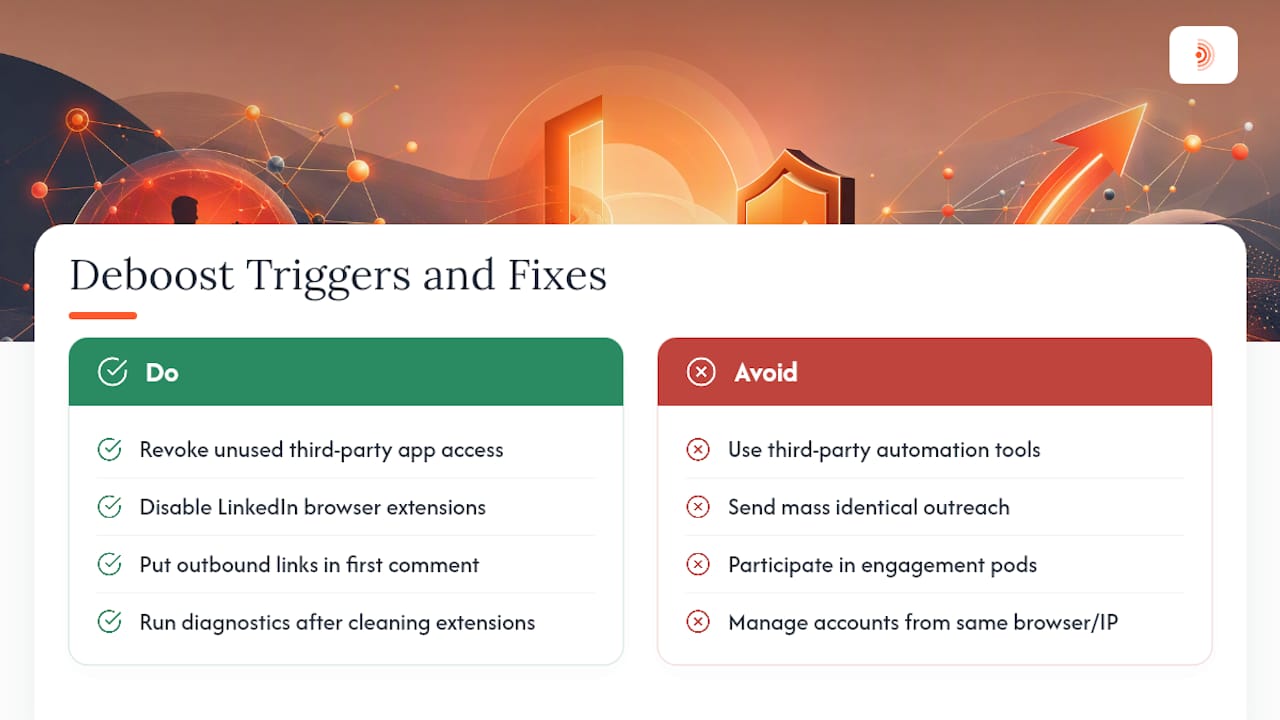
Third-party automation is the leading cause. Tools that auto-like, auto-comment, or auto-connect at scale generate activity patterns no human could replicate, and LinkedIn's systems are trained to detect them. This includes browser extensions that run in the background without your active involvement.
Mass identical outreach is a close second. Sending the same connection request message to 50 people in a day, or blasting identical InMail to a list, triggers spam filters fast. LinkedIn's systems compare message content across sends, and repetition is a strong signal.
Coordinated engagement pods create a different kind of problem. When a group of accounts systematically likes and comments on each other's posts within minutes of publishing, the engagement pattern looks artificial. LinkedIn has become increasingly effective at identifying pod behavior, and accounts participating in them risk having that engagement discounted or flagged.
High "hide" and report rates on your content tell the algorithm your posts aren't wanted. If a meaningful percentage of people who see a post choose to hide it from their feed, that's a direct quality signal that suppresses future distribution.
Shared device and IP environments matter more than most people realize. If you manage multiple LinkedIn accounts from the same browser profile or IP address, a flag on one account can spread to others sharing that fingerprint. This is a particular risk for agencies running client accounts.
Pro Tip: Before anything else, go to LinkedIn Settings > Data Privacy > Other Applications and revoke access for any third-party app you don't actively use. Then check your browser extensions and disable anything that interacts with LinkedIn. Do this before running diagnostic tests so your results reflect a clean environment.
Outbound links placed directly in post captions also carry a documented reach discount at the post level. Many creators work around this by placing links in the first comment instead of the caption itself.
How to test whether your LinkedIn profile visibility is actually suppressed
Don't guess. Run these tests in order and record what you find. You'll need the results if you escalate to LinkedIn support.
Test 1: The logged-out visibility check
Open a private/incognito browser window and go to LinkedIn.com without logging in. Search your full name. If your profile doesn't appear in the first few results (accounting for common names), that's a suppression signal. Then search a recent post's exact headline text. No result is a stronger signal.
Test 2: The hashtag "Latest" test
From a second LinkedIn account (a colleague's or a personal account you don't use for posting), search one of the hashtags you used in a recent post. Click "Latest" to sort by recency. Your post should appear near the top if it was published recently. If it doesn't show up at all, that's one of the clearest available signals of distribution suppression. Run this across at least three posts before drawing a conclusion.
Test 3: Non-connection impressions in post analytics
Open any post published in the last two weeks and click "View analytics." Look at the impressions breakdown between connections and non-connections. A healthy post typically reaches beyond your immediate network. If non-connection impressions are near zero across multiple posts, suppression is likely active. The diagnostic signals to monitor include this split alongside search appearance and comment visibility.
Test 4: Comment visibility check
Leave a comment on a public post from a major creator. Then ask someone with no connection to you to view that same post and confirm whether your comment is visible. Invisible comments are a direct suppression indicator.
What to record for a potential appeal
| Data point | What to capture |
|---|---|
| Post URLs | Direct links to 3+ affected posts |
| Impression screenshots | Before/after analytics showing the drop |
| Hashtag test results | Screenshots from the second account showing absence |
| Logged-out search results | Screenshot of your profile not appearing |
| Timeline | Exact dates when the drop began |
| Recent actions | Any automation tools, extensions, or campaigns active at that time |
A prioritized recovery checklist you can follow right now
Recovery from reach suppression follows a clear sequence. Don't skip steps or run them out of order.
- Pause all automation and scheduled posts immediately. Every tool, every queue, every browser extension that touches LinkedIn. This stops the behavior generating the signal.
- Revoke third-party app permissions. Go to Settings > Data Privacy > Other Applications. Remove anything you didn't explicitly authorize recently. Check your automation tool risks before reconnecting anything.
- Delete or edit posts with high hide/report rates. If you can identify posts that received unusually low engagement relative to impressions, or that you know violated policy, remove them. Don't leave them sitting there generating ongoing negative signals.
- Drop your posting cadence. For the first two weeks, post no more than two to three times per week. Post only content you'd genuinely be proud of. Quality signals matter more than volume during recovery.
- Place links in comments, not captions. For any post where you need to share a URL, put it in the first comment after publishing rather than in the post body.
- Resume engagement manually. Leave thoughtful, specific comments on posts in your niche. This is the activity most likely to generate positive signals without triggering automation flags.
Timeline expectations: Creator reports and trackers consistently describe lighter cases resolving in a few weeks after stopping the triggering behavior. Cases tied to heavy automation or engagement pods can take several weeks to months of clean activity before reach meaningfully recovers. Don't interpret slow recovery in the first two weeks as evidence that nothing is working.
Recovery is starting when you see non-connection impressions returning to your post analytics, your profile reappearing in logged-out searches, and profile views trending back up. These signals usually return before raw impression counts normalize.
How to rebuild reach and prevent suppression from recurring
Short-term recovery gets you back to baseline. Staying there requires different habits.
The core principle is behavioral consistency. LinkedIn's algorithm builds a model of your account's activity patterns over time. Accounts that post consistently, receive genuine engagement, and don't generate negative signals (hides, reports, rejections) earn better distribution. That trust is rebuilt gradually, not overnight.
Weekly metrics to track for ongoing profile visibility monitoring:
- Impressions split between connections and non-connections (watch for the non-connection share recovering toward your pre-suppression baseline)
- Search appearances (visible in LinkedIn analytics under "Search appearances")
- Profile views week-over-week
- Connection acceptance rate (if you're sending invitations)
A meaningful signal is a change of 20% or more sustained over two consecutive weeks, not a single-day fluctuation.
Content habits that reduce future risk:
- Write original posts that reflect your actual expertise. Reposts and reshares generate weaker signals than original content.
- Personalize every connection request with a specific, relevant note. Generic "I'd like to connect" messages have higher rejection rates.
- Avoid engagement pods entirely. The short-term boost isn't worth the suppression risk, and LinkedIn's detection has improved significantly.
- If you manage multiple accounts, use separate browser profiles and separate network environments for each. Shared fingerprints remain one of the clearest documented triggers for cross-account flagging.
For deeper discoverability gains, LinkedIn keyword optimization in your headline and about section reinforces the profile signals that help you appear in search, independent of post reach.
One underrated recovery tactic: focus on comments more than posts during the first 30–60 days. A well-placed, specific comment on a high-reach post can generate profile views and connection requests without triggering any of the posting-frequency signals that got you flagged. Tactics for increasing visibility through AI-assisted comments are worth reviewing here, particularly the guidance on comment quality and timing.
If you use automation: what safe practices actually look like
Automation isn't the problem. Uncontrolled automation is. The distinction matters because blanket avoidance of tools leaves real efficiency on the table, while the wrong tool can undo months of recovery work in days.
Safe automation tools share a specific set of characteristics:
- Human review before any action posts. Every comment, message, or connection request is drafted and queued for your approval before it goes live. No auto-post without explicit sign-off.
- Per-day activity caps that mirror human behavior. A tool sending 200 connection requests in a day is a liability. Safe tools apply daily limits that stay within ranges a real person could plausibly generate.
- Unique, natural timing windows. Actions distributed across working hours with randomized intervals, not batched at identical timestamps.
- Audit logs. You should be able to see exactly what the tool did, when, and from which account.
- Account isolation for multi-account setups. Each LinkedIn account operates from a distinct browser environment and, ideally, a distinct IP.
Red flags that disqualify a tool immediately:
- Auto-posts comments or messages without requiring your approval
- Sends identical message text to multiple recipients
- Promises guaranteed follower growth or engagement numbers
- Operates from a shared IP pool used by many other accounts
- Has no activity cap settings
Pro Tip: Run a "pause-and-test" experiment before committing to any automation tool. Use it for two weeks, then pause it completely for two weeks and compare your non-connection impressions across both periods. If impressions improve during the pause, the tool was generating suppression signals.
The guide on automating LinkedIn comments without getting banned covers the human-in-loop approval model in detail, including how to structure comment queues so they read as genuinely personal rather than templated.
When and how to contact LinkedIn support about reach suppression
Most suppression cases resolve through behavioral changes without ever needing a support ticket. File one when you meet at least one of these criteria:
- You have an explicit in-app banner or notification indicating a restriction (this is a clear, documented case worth escalating)
- You've completed 2–4 weeks of clean activity with no automation, no mass outreach, and no policy-adjacent content, and your diagnostics still show suppression
- You can demonstrate with screenshots and analytics that the drop is sustained and unexplained by content quality
When you do file, the message structure matters. Here's a template you can adapt:
Avoid using the word "shadowban" as your primary descriptor in the ticket. LinkedIn's support team responds to policy language, not informal platform slang. Describe the observable behavior: "sustained drop in impressions," "profile not appearing in logged-out search," "posts absent from hashtag Latest results."
Where to file: go to the LinkedIn Help Center and navigate to "Account Restrictions" or use the in-app "Help" button if you have an active restriction banner. For suppression without a banner, use the general "Something isn't working" path and describe the specific symptoms.
What I've seen work, and what people get wrong
The most common mistake I see is treating a LinkedIn shadowban as a mystery to solve rather than a signal to respond to. Creators spend days theorizing about which post triggered it when the answer is almost always the same: automation that ran too hot, outreach that looked like spam, or engagement pod activity that LinkedIn's systems flagged weeks before the visible drop appeared.
The second mistake is impatience. Two weeks of clean activity feels like forever when your reach is suppressed, and most people either give up and go back to the behavior that caused the problem, or they start posting more aggressively to compensate. Both responses extend the suppression window. The accounts that recover fastest are the ones that go quiet, fix the environment, and let the algorithm recalibrate.
What actually works: a genuine pause, a clean diagnostic, and a return to posting that prioritizes comment-based engagement over broadcast posts for the first month. Comments generate profile views and connection requests without triggering the posting-frequency signals that got you flagged in the first place. That's not a workaround; it's how LinkedIn's engagement model was designed to work.
Sources
The links below cover official policy, practical diagnostics, and real creator examples. Use the LinkedIn Help Center and Professional Community Policies for authoritative guidance on what LinkedIn permits. Use the diagnostic and tracker sources for self-testing methodology and timeline expectations. Use the creator examples for real-world corroboration of suppression patterns.
- 10 Signs You’re Shadowbanned on Social Media
- Lifa
- What Is a LinkedIn Shadow Ban? | ContentIn
- LinkedIn Shadowban: What It Is and How It Works
- LinkedIn Shadowban: What It Is and How to Remove It 2026 — Palladium SMM
- Am I Shadowbanned? How to Check & Fix It | CampaignSwift
- LinkedIn Shadowban: Understand, Avoid & Fix ... — Simone Wight (LinkedIn Pulse)