

If you're evaluating PhantomBuster alternatives, the short answer is: pick by job, not by brand. For scraping, developer-grade tools like Apify and Bright Data outperform PhantomBuster at scale. For LinkedIn outreach, cloud platforms like Expandi and Dripify carry lower ban risk. For enrichment and GTM workflows, Apollo.io, Clay, and Snov.io each cover different parts of the stack. And for safe LinkedIn engagement through commenting, Echoza is the lowest-risk entry point available.
Here's the fastest way to match your job to the right category:
- Scraping at scale: Developer scrapers (Apify, Zyte, Bright Data, Octoparse, Outscraper) handle high-volume extraction with proxy infrastructure built in.
- LinkedIn outreach automation: Cloud-based platforms (Expandi, Waalaxy, Dripify, Zopto, Linked Helper, Dux-Soup) run sequences from the cloud or browser with safety controls.
- Lead enrichment and data sourcing: Enrichment tools (Apollo.io, Snov.io, Evaboot) find and verify contact data without touching LinkedIn automation limits.
- GTM orchestration and workflow building: Platforms like Clay, Captain Data, Trigify, and Bardeen connect data sources, enrichment, and outreach into automated pipelines.
- Safe LinkedIn commenting: Echoza drafts personalized comments in your voice, holds them for your approval, and posts within daily caps. No mass connection requests, no scraping, and no account flags.
G2 reviewers consistently flag PhantomBuster as feature-rich but complex to set up, with account safety concerns surfacing regularly. Capterra echoes that, pointing to pricing opacity and workflow fragility. If either of those pain points sounds familiar, a specialist tool almost certainly serves you better.
Table of Contents
- Which PhantomBuster alternatives should you compare?
- When should you keep PhantomBuster vs. switch to something else?
- How do the top alternative categories perform in practice?
- How do you keep your LinkedIn account safe when automating?
- How we evaluated and ranked these alternatives
- What should you ask before choosing a PhantomBuster alternative?
- Key Takeaways
- Why low-risk engagement strategies win in the long run
- Echoza: the comment-first path to LinkedIn visibility
- Further reading: the research and review pages we used
Which PhantomBuster alternatives should you compare?
The table below maps each category to the dimensions that actually drive buying decisions: risk, price shape, setup time, and what the tool outputs.
| Category | Best for | Pricing shape | LinkedIn safety | Setup time | Primary function | Outputs / integrations | Scalability |
|---|---|---|---|---|---|---|---|
| Developer scrapers (Apify, Zyte, Bright Data) | Engineers, data teams, large-volume extraction | Usage-based; free tiers available | Low risk (no LinkedIn login) | Hours to days | Web scraping, proxy infra | CSV, JSON, API, webhooks | Very high |
| No-code scrapers (Octoparse, Outscraper) | Non-technical teams needing structured data | Freemium to ~$75/mo | Low to medium risk | Minutes to hours | Point-and-click scraping | CSV, Excel, Google Sheets | Medium |
| Cloud LinkedIn outreach (Expandi, Waalaxy, Zopto, Dripify) | SDRs running connection + message sequences | $39–$99/mo per seat | Medium risk (cloud IP, pacing controls) | Hours | LinkedIn outreach sequences | CRM sync, CSV, Zapier | Medium to high |
| Template-driven LinkedIn tools (Dux-Soup, Linked Helper) | Solo reps, small teams, budget-conscious buyers | $12–$55/mo | Medium to high risk (browser extension) | Minutes | Visit, connect, message | CSV, Zapier, HubSpot | Low to medium |
| Enrichment and GTM builders (Apollo.io, Snov.io, Evaboot, Clay, Trigify) | RevOps, growth teams building contact lists | Freemium to $99+/mo | Low risk (no automation on LinkedIn) | Hours | Data enrichment, list building | CRM, CSV, API, Zapier | High |
| Orchestration platforms (Captain Data, Bardeen) | Ops teams chaining multiple data sources | $50–$200+/mo | Medium risk (depends on actions triggered) | Days | Workflow automation, data pipelines | API, webhooks, CRM | High |
| Commenting automation (Echoza) | Professionals scaling LinkedIn visibility safely | Subscription tiers; free trial | Low risk (approval workflow, daily caps) | Minutes | AI-drafted comment automation | Browser extension, multi-account | Medium |
CB Insights' category analysis and SaaSHub's 2026 alternatives list both confirm this category breadth. The market has fragmented into specialists, and a single catch-all tool rarely wins on every dimension.
Quick category guide:
- Pick developer scrapers when you need raw data at volume and have engineering support.
- Pick cloud LinkedIn outreach when your bottleneck is booking meetings from a contact list.
- Pick enrichment tools when your list quality is the problem, not your outreach volume.
- Pick orchestration platforms when you're chaining three or more data sources and tools.
- Pick Echoza when you want LinkedIn visibility without the account risk of mass outreach.
When should you keep PhantomBuster vs. switch to something else?
PhantomBuster is a browser-automation workbench. It runs "phantoms" — pre-built scripts that automate tasks across LinkedIn, Twitter/X, Instagram, and other platforms. That model works well for teams that need cross-platform flexibility and are comfortable stitching workflows together manually.
Keep PhantomBuster when:
- You need to automate tasks across multiple platforms (not just LinkedIn) from one interface.
- Your team has technical capacity to configure and maintain phantom chains.
- You're running occasional, low-volume LinkedIn exports from Sales Navigator.
- You want a single tool to experiment with before committing to a specialist stack.
Switch to a specialist when:
- Scraping is your primary job. PhantomBuster's extraction speed and proxy handling don't match what Apify, Zyte, or Bright Data deliver at scale. A developer scraper will be faster, cheaper per record, and more reliable.
- LinkedIn outreach is your bottleneck. Cloud platforms like Expandi and Dripify are purpose-built for connection sequences, A/B testing messages, and CRM sync. PhantomBuster can do outreach, but it requires more maintenance and carries higher ban risk without dedicated safety controls.
- You need enrichment, not automation. Apollo.io, Snov.io, and Evaboot find and verify emails and phone numbers without touching LinkedIn automation limits. If your problem is data quality, not workflow automation, these tools solve it more directly.
- Account safety is a hard requirement. G2 reviewers regularly cite account flags as a concern with PhantomBuster. Tools with explicit per-account caps, warm-up flows, and cloud-based execution reduce that risk structurally.
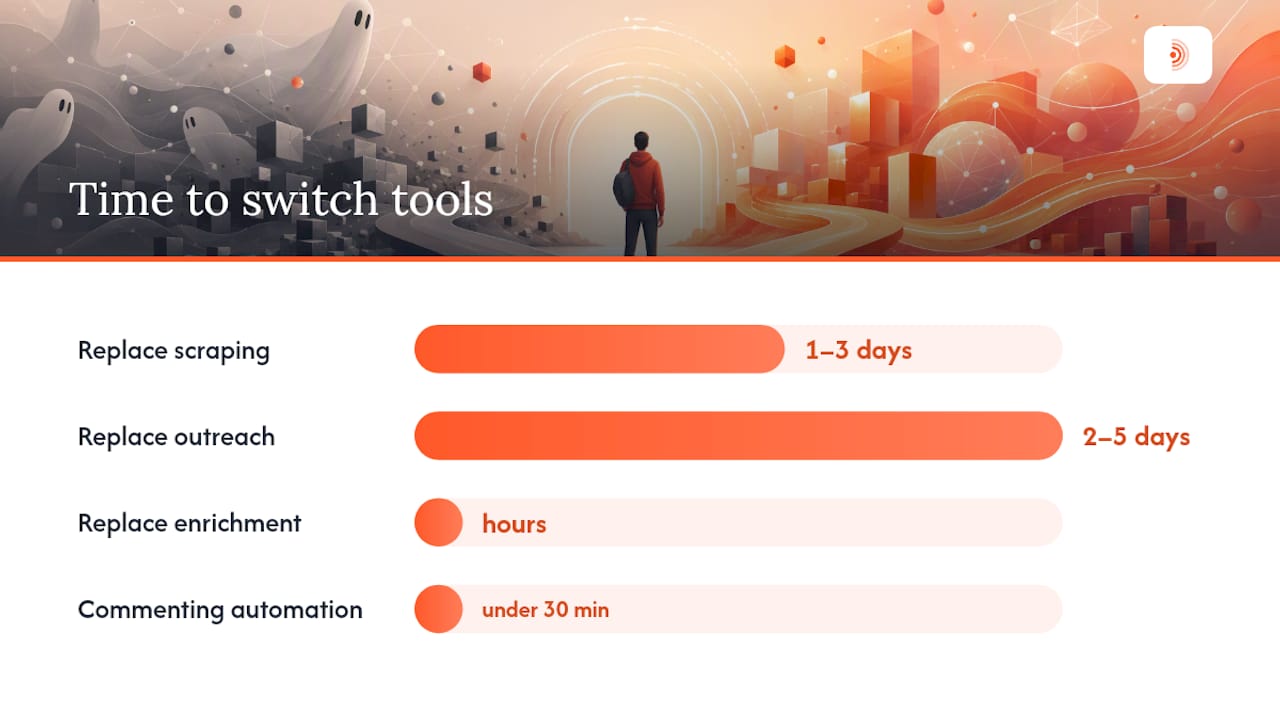
Timeline to switch: Replacing a scraping workflow takes one to three days with a developer scraper. Replacing a LinkedIn outreach sequence takes two to five days to configure a cloud platform and warm up the account. Replacing enrichment takes hours. Commenting automation like Echoza can be live in under 30 minutes.
Industry roundups consistently frame the migration decision around job-to-be-done: once you identify the primary job, the right category becomes obvious and the switch is faster than most teams expect.
How do the top alternative categories perform in practice?
Developer scrapers: Apify, Zyte, Bright Data
These platforms handle high-volume extraction with proxy rotation, anti-bot handling, and structured data outputs. Apify offers a marketplace of pre-built actors (scrapers) for common sites. Zyte (formerly Scrapinghub) provides managed scraping infrastructure. Bright Data is the proxy and data collection layer many enterprise teams run underneath other tools.
Pros: Massive scale, reliable proxy infrastructure, API-first outputs. Cons: Require engineering time to configure and maintain, not designed for LinkedIn login-based automation, usage costs scale with volume. Pricing: Free tiers available; typical spend ranges from $49/mo to several hundred dollars for heavy usage. U.S. availability: All three are fully available in the U.S. Example workflow: Pull a list of companies from a public directory, extract decision-maker names and titles, export to CSV, then pass to an enrichment tool for email verification.
No-code scrapers: Octoparse, Outscraper
Point-and-click tools that let non-technical users extract structured data from websites without writing code. Octoparse uses a visual workflow builder. Outscraper focuses on Google Maps and review data extraction.
Pros: No coding required, fast setup, good for SMB teams. Cons: Limited to public web data, less flexible than developer scrapers, can break when site structures change. Pricing: Freemium to roughly $75/mo. U.S. availability: Both available in the U.S. Example workflow: Extract a list of local businesses from Google Maps using Outscraper, then import into a CRM for outreach.
Cloud LinkedIn outreach: Expandi, Waalaxy, Zopto, Dripify
These platforms run LinkedIn connection and message sequences from the cloud, with safety controls like randomized timing, per-account daily caps, and dedicated IP addresses. Expandi and Dripify are strong for individual SDRs. Waalaxy adds a multichannel email layer. Zopto targets teams that need agency-style multi-seat management.
Pros: Purpose-built for LinkedIn sequences, CRM integrations, A/B testing, pacing controls built in. Cons: Monthly per-seat cost adds up for large teams, still carry medium account risk if misconfigured, limited to LinkedIn and email. Pricing: $39–$99/mo per seat is typical. U.S. availability: All available in the U.S. Example workflow: Import a filtered Sales Navigator list, run a connection request sequence with a personalized note, follow up with two message steps over 10 days, sync replies to HubSpot.
Pro Tip: Warm up a new LinkedIn account for at least two weeks before running any outreach sequence. Start with 10–15 connection requests per day and increase by five each week. Skipping this step is the single most common cause of account restrictions.
Template-driven LinkedIn tools: Dux-Soup, Linked Helper
Browser extension or desktop app tools that automate LinkedIn visits, connections, and messages. Lower cost than cloud platforms, but they run from your browser or local machine, which increases detection risk.
Pros: Low entry price, simple setup, good for solo users. Cons: Higher ban risk than cloud tools, limited scalability, require your browser to stay open. Pricing: $12–$55/mo. U.S. availability: Both available in the U.S. Example workflow: Auto-visit 50 profiles per day from a saved LinkedIn search, send a connection request to those who viewed back, follow up with a message template.
Enrichment and GTM builders: Apollo.io, Snov.io, Evaboot, Clay, Trigify
Apollo.io is a full-stack sales intelligence platform with a large contact database, email sequencing, and CRM sync. Snov.io focuses on email finding and verification. Evaboot specializes in clean Sales Navigator exports with duplicate removal. Clay and Trigify are workflow builders that pull from multiple data sources and enrich records with AI-assisted research.
Pros: No LinkedIn automation risk, high data quality, strong CRM integrations. Cons: Database coverage varies by industry and geography, not a replacement for outreach automation. Pricing: Freemium plans available; typical spend $49–$149/mo depending on contact volume. U.S. availability: All available in the U.S., with strong U.S. contact coverage. Example workflow (Clay): Pull a list of job-change signals from Trigify, enrich each record with company data and a personalized research summary via Clay's AI columns, push the enriched list to Apollo.io for sequencing.
Proxy and infrastructure providers: Bright Data
Bright Data sits underneath many automation stacks as the proxy layer. It provides residential, datacenter, and mobile proxies that reduce detection risk for any scraping or automation tool running at scale.
Pros: Enterprise-grade proxy network, supports most scraping tools, detailed compliance documentation. Cons: Adds cost to an already multi-tool stack, requires technical configuration. Pricing: Usage-based; entry plans available. U.S. availability: Full U.S. coverage.
Orchestration platforms: Captain Data, Bardeen
Captain Data connects data sources and automates multi-step workflows without custom code. Bardeen is a browser-based automation tool that handles repetitive research and data-moving tasks. Both sit in the "glue layer" between data sources and outreach tools.
Pros: Reduce manual data-moving work, connect tools that don't have native integrations, good for ops-heavy teams. Cons: Setup takes days for complex workflows, medium account risk if LinkedIn actions are triggered, pricing scales with usage. Pricing: $50–$200+/mo. U.S. availability: Both available in the U.S. Example workflow: Captain Data pulls enriched company records from Apollo.io, filters by hiring signal, and pushes qualified accounts into a Dripify sequence automatically.
Commenting automation: Echoza
Echoza ranks your LinkedIn feed by relevance, drafts comments in your voice based on your style and past activity, holds every comment for your review before posting, and schedules approved comments across working hours. It manages multiple LinkedIn accounts and applies daily activity caps.
Pros: Lowest LinkedIn account risk of any automation category, personalized output, approval workflow prevents off-brand comments. Cons: Focused on commenting only (not outreach sequences or scraping), requires an active LinkedIn presence to be effective. Pricing: Subscription tiers with a free trial; paid plans for expanded usage and team features. U.S. availability: Available in the U.S. Example workflow: Echoza surfaces five high-reach posts in your niche each morning, drafts a comment for each in your voice, you approve or edit in one pass, and the comments post throughout the day at natural intervals.
How do you keep your LinkedIn account safe when automating?
Account safety is the primary purchase filter for any LinkedIn automation tool in 2026. ColdIQ's comparative analysis puts it plainly: vendors that expose explicit pacing controls, per-account caps, and documented warm-up flows reduce operational risk for GTM teams. The ones that don't are a liability.
The core safety levers, in order of importance:
- Daily activity caps: Every tool you run on LinkedIn should have a hard per-account daily limit for connections, messages, and profile visits. Exceeding LinkedIn's informal thresholds (roughly 20–25 connection requests per day for newer accounts) is the fastest path to a restriction.
- Randomized timing: Automation that fires at perfectly regular intervals looks like a bot. Tools that randomize delays between actions are harder to detect.
- Account warm-up: New accounts and newly automated accounts need a ramp period. Start low, increase gradually over two to four weeks.
- Dedicated IPs or cloud execution: Browser extensions that run from your local IP are easier for LinkedIn to flag than cloud platforms with dedicated residential IPs. If you're running volume, the IP layer matters.
- Proxy strategy: For scraping tools that don't touch LinkedIn login, residential proxies from providers like Bright Data reduce detection risk significantly.
- Multi-account policies: If you manage multiple LinkedIn accounts, each should have its own IP, its own warm-up history, and its own daily cap. Sharing infrastructure across accounts multiplies risk.
Questions to ask any vendor before buying:
- Does the tool enforce per-account daily caps, and can I set them myself?
- Does it use dedicated IPs or residential proxies for LinkedIn actions?
- Is there a documented warm-up flow or onboarding guide for new accounts?
- What happens if LinkedIn updates its detection methods? How quickly does the vendor respond?
- Is there published compliance documentation or a terms-of-service review?
For a deeper look at how to automate LinkedIn comments without getting banned, Echoza's blog covers the technical and behavioral factors in detail.
Risk level guide:
- Low risk: No LinkedIn login required (scraping public data), or approval-gated commenting with daily caps (Echoza).
- Medium risk: Cloud outreach platforms with pacing controls and dedicated IPs. Risk exists but is managed.
- High risk: Browser extensions running from your local machine, or any tool without explicit rate limiting.
How we evaluated and ranked these alternatives
The recommendations in this article are based on a structured evaluation across seven criteria, triangulated from vendor documentation, G2 and Capterra review aggregations, and published roundups from Sparkle.io and ColdIQ.
- Pricing transparency: — Are plans and limits clearly published? Capterra reviewers specifically flag pricing opacity as a pain point with PhantomBuster, so tools with clear public pricing scored higher.
Categories scored higher when they addressed the job cleanly, had strong safety controls, and offered transparent pricing. PhantomBuster's generalist model scores well on flexibility but lower on safety controls and setup simplicity, which is why specialists win for most single-job use cases.
What should you ask before choosing a PhantomBuster alternative?
Use this checklist before committing to any tool. It covers the questions that surface problems before they cost you an account restriction or a wasted quarter.
- Does the tool enforce per-account daily caps? If the vendor can't tell you the exact limit, that's a problem.
- Is there a documented warm-up protocol? Any tool touching LinkedIn automation should have one.
- What IP infrastructure does it use? Cloud with dedicated IPs is safer than a browser extension on your home IP.
- Is there a free trial or free tier? You should be able to run a proof-of-concept before paying.
- Can you export your data? CSV and API export should be standard. Proprietary lock-in on your own contact data is a red flag.
- Does it integrate with your CRM? HubSpot and Salesforce connectors are table stakes for most GTM teams.
- Is there published compliance documentation? The vendor should be able to point you to a page explaining how their tool handles LinkedIn's terms of service.
- What are the SLAs for support? If your account gets flagged at 9 PM on a Tuesday, how fast does the vendor respond?
- How does pricing scale? Some tools look cheap at entry but get expensive fast with seat counts or contact volume. Map the cost at 3x your current usage.
- Who on your team owns the migration? Scraping replacements need an engineer. Outreach platform migrations need a GTM ops person or a senior SDR. Commenting automation like Echoza can be set up by anyone in under an hour.
Red flags that should pause a purchase:
- No free trial and no refund policy.
- Rate limits described as "flexible" with no specific numbers.
- No published documentation on LinkedIn compliance.
- Support only via a community forum with no SLA.
For a broader view of LinkedIn outreach automation tools and how they compare on these criteria, that resource covers the outreach category in more depth.
Who should lead the migration? For scraping replacements, an engineer or data analyst should own the setup. For outreach platform migrations, a GTM ops manager or senior SDR is the right lead. For commenting automation, anyone on the marketing or sales team can configure Echoza in a single session.
Key Takeaways
The fastest path from PhantomBuster to a better outcome is matching your primary job to the right specialist category, then choosing the tool in that category with the strongest safety controls and clearest pricing.
| Point | Details |
|---|---|
| Match job to category | Scraping, outreach, enrichment, orchestration, and commenting each have specialist tools that outperform a generalist workbench. |
| Safety controls are non-negotiable | Per-account daily caps, randomized timing, and documented warm-up flows are the minimum bar for any LinkedIn automation tool. |
| Setup time varies by category | Commenting automation (Echoza) takes under 30 minutes; outreach platform migrations take two to five days; scraping replacements take one to three days with engineering support. |
| Pricing transparency matters | Tools with clear public pricing and a free trial reduce buying risk; opacity on limits and costs is a consistent pain point flagged on G2 and Capterra. |
| Echoza for safe commenting | Echoza is the lowest-risk entry point for LinkedIn engagement automation, with an approval workflow and daily caps that keep accounts safe. |
Why low-risk engagement strategies win in the long run
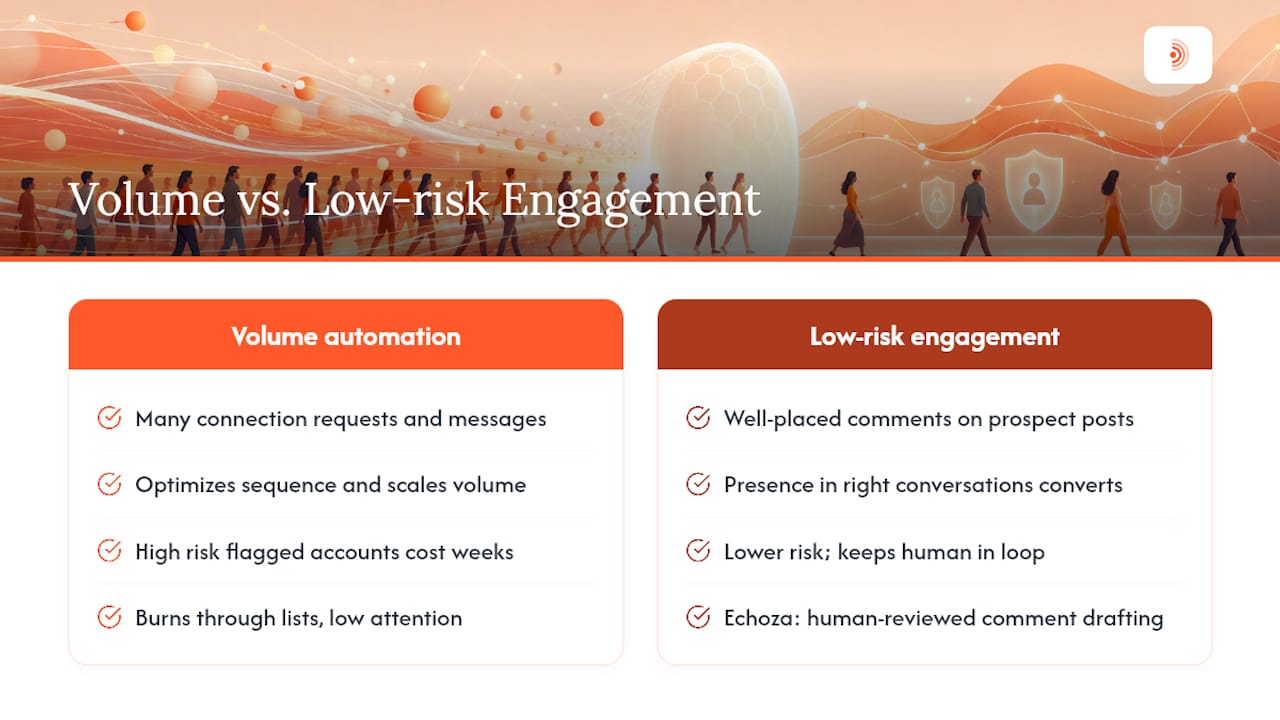
The conventional wisdom in LinkedIn automation circles is that volume wins. More connection requests, more messages, more touchpoints. Run the numbers, optimize the sequence, scale the machine.
That framing misses something. LinkedIn's enforcement has tightened steadily, and the cost of an account restriction is not just a few days of downtime. For a senior sales rep or a founder whose LinkedIn presence is their primary pipeline source, a flagged account can mean weeks of recovery, lost warm relationships, and a credibility hit that's hard to quantify. The math on "more volume" changes fast when you factor in that downside.
What actually converts on LinkedIn in 2026 is presence in the right conversations, not volume of cold interruptions. A well-placed comment on a post your prospect just engaged with does more than a connection request they'll ignore. It signals that you're paying attention, that you have something worth saying, and that you're not just running a list. That's the insight behind commenting automation as a category: it scales the behavior that actually builds relationships, rather than the behavior that burns through lists.
The teams I'd bet on are the ones running a two-tool stack: a clean data source for list building, and a low-risk engagement layer for warming up the accounts they care about. Echoza fits that second slot better than anything else in this comparison, precisely because it keeps a human in the loop on every comment while still removing the daily friction of finding and drafting them manually.
For the empirical support behind this view, the How do you keep your LinkedIn account safe when automating? and the How we evaluated and ranked these alternatives lay out the criteria and the risk-level framework in detail.
Echoza: the comment-first path to LinkedIn visibility
Most of the tools in this comparison automate the high-risk behaviors: mass connection requests, bulk messaging, scraping at scale. Echoza takes the opposite approach, and that's exactly what makes it worth your attention if account safety is a real constraint.
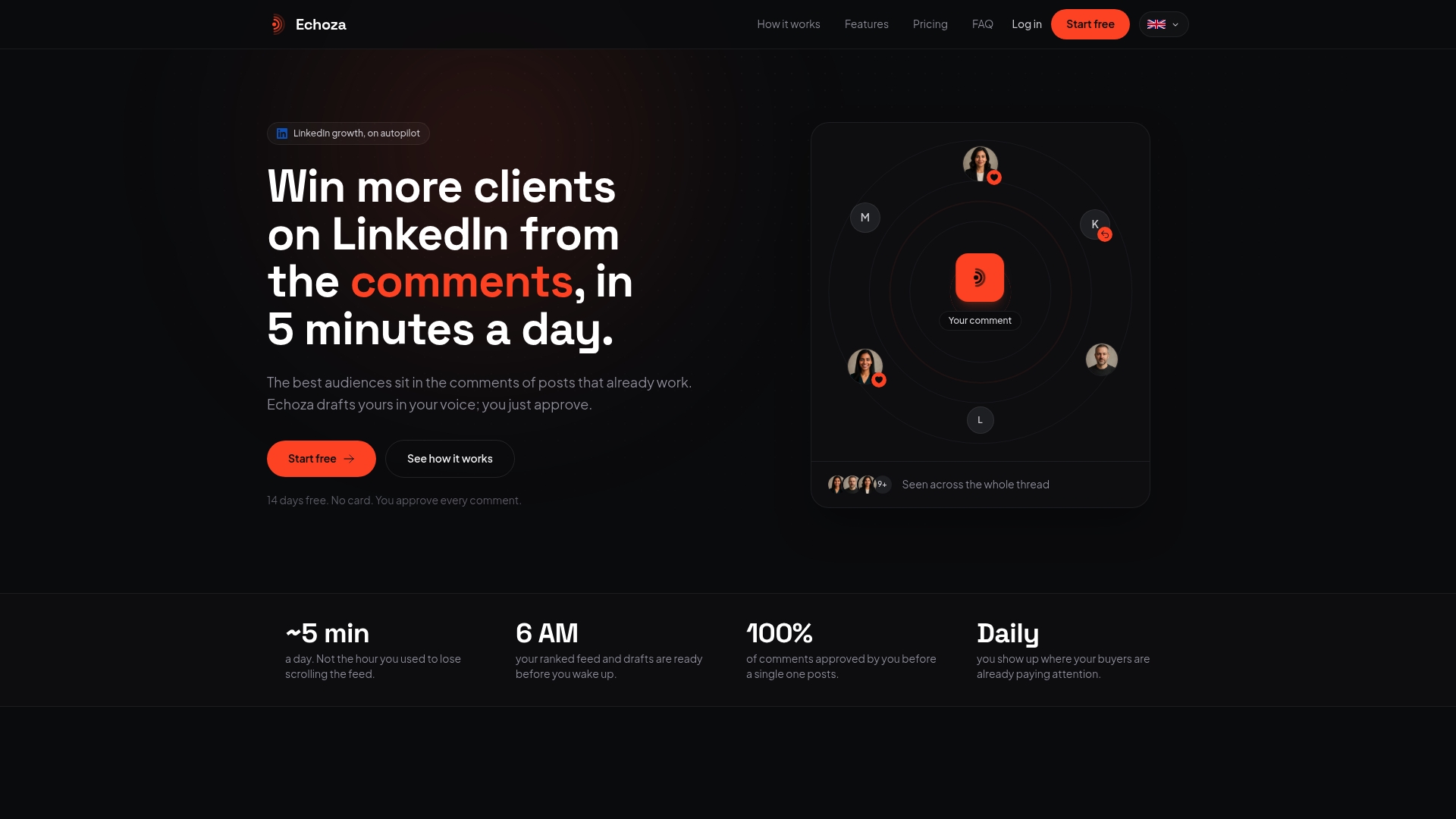
Echoza ranks your LinkedIn feed by relevance to your niche, drafts personalized comments in your voice based on your actual writing style and past activity, and holds every comment for your approval before anything posts. You review, edit if needed, and approve. Echoza schedules the approved comments across your working hours at natural intervals. Daily activity caps are built in, not optional. Multi-account management lets agencies and teams run separate voice profiles without cross-contamination.
The result: consistent LinkedIn visibility without the account risk that comes with outreach automation. No cold connection requests, no message sequences, no scraping. Just comments that sound like you, placed where your prospects are already paying attention.
Echoza is available in the U.S. with a 14-day free trial. If you want to win more clients from your LinkedIn comments without risking the account you've spent years building, that's where to start.
Further reading: the research and review pages we used
These sources informed the category rankings, safety guidance, and pricing notes throughout this article. Check vendor documentation directly for current pricing and compliance details, as both change frequently.
- PhantomBuster reviews on G2: Aggregated user sentiment on usability, safety concerns, and workflow complexity. The most reliable signal for real-world pain points.
- PhantomBuster reviews on Capterra: Complements G2 with additional user feedback on pricing transparency and workflow reliability.
- CB Insights: PhantomBuster alternatives and competitors: Category-level competitive analysis useful for understanding how the market is segmented.
- SaaSHub: PhantomBuster alternatives (2026): Updated alternatives list with category breadth and pricing band examples.
- Sparkle.io: 11 best PhantomBuster alternatives (2026): Hands-on roundup framed by job-to-be-done with minimum-viable stack recommendations.
- ColdIQ: Top PhantomBuster competitors for lead gen (2026): Use-case and price-band organization that supports the category-first recommendation approach.
For tool-specific safety documentation, go directly to each vendor's help center and look for their LinkedIn compliance or terms-of-service guidance page. If that page doesn't exist, treat it as a red flag.