

For LinkedIn users who want AI-powered commenting that stays in their voice, Echoza is the recommended pick among HeyReach alternatives. It drafts comments that match your tone, holds them for your approval before posting, schedules them across working hours, and applies daily activity caps to keep your account safe. If you need something different, the main categories worth knowing are:
- Cloud multi-account platforms (best for agencies running outreach sequences across many LinkedIn seats)
- Browser-extension tools (low-cost entry for solo users, limited team features)
- Multi-channel platforms (email + LinkedIn bundled, good if email is your primary channel)
- Managed-service providers (done-for-you execution, but you hand over messaging control)
Echoza fits professionals who want to stay in the driver's seat on every comment. If your GTM motion runs through Salesforce or HubSpot and you need full sequence automation across dozens of accounts, a cloud multi-account platform may suit you better. If you want someone else to run the whole campaign, a managed service is the trade-off to consider.
Table of Contents
- How do HeyReach alternatives compare on the dimensions that matter?
- Which evaluation dimensions actually affect your results?
- Why Echoza is the recommended pick for U.S. LinkedIn users
- How do you choose the right HeyReach alternative for your workflow?
- When does a managed service make more sense than self-serve software?
- What integrations go beyond CRM?
- What should you expect from data export and reporting?
- How does customer support differ across these tools?
- How do the interfaces compare across tool categories?
- Which business sizes does each tool category fit?
- What do user reviews and case studies show?
- Key Takeaways
- The case for keeping humans in the loop
- Echoza gives you commenting automation that stays in your voice
- Useful sources and further reading
How do HeyReach alternatives compare on the dimensions that matter?
| Dimension | Echoza | Cloud multi-account platforms | Browser-extension tools | Multi-channel platforms | Managed services |
|---|---|---|---|---|---|
| Best for | Professionals, freelancers, small teams | Agencies, high-volume outreach | Solo users, early pilots | Email-first teams adding LinkedIn | Teams with no internal capacity |
| Automation focus | Commenting-only, feed-ranking | Connection sequences, multi-account messaging | Scraping, basic automation | Email + LinkedIn sequences | Full campaign execution |
| AI personalization | Drafts in your voice, approval workflow | Template-based, limited voice matching | Minimal AI personalization | AI SDR drafts, unified inbox | Managed by vendor copywriters |
| Messaging control | Human-in-the-loop (you approve every comment) | Mostly automated | Mostly automated | Mostly automated | Vendor-controlled |
| CRM integrations | HubSpot, Salesforce via Zapier | Varies; often native Salesforce/HubSpot | Limited | Native CRM connectors common | Depends on vendor |
| Multi-account & team | Multiple LinkedIn accounts + voice profiles | Core strength | Limited | Varies | Vendor-managed |
| Safety controls | Daily activity caps, rate limiting | Per-account limits, varies by platform | Basic daily limits | Varies | Opaque unless vendor discloses |
| Pricing & free trial | 14-day free trial, tiered subscription | Seat-based, typically no free trial | Freemium available | Bundled subscription | High fixed fees, no trial |
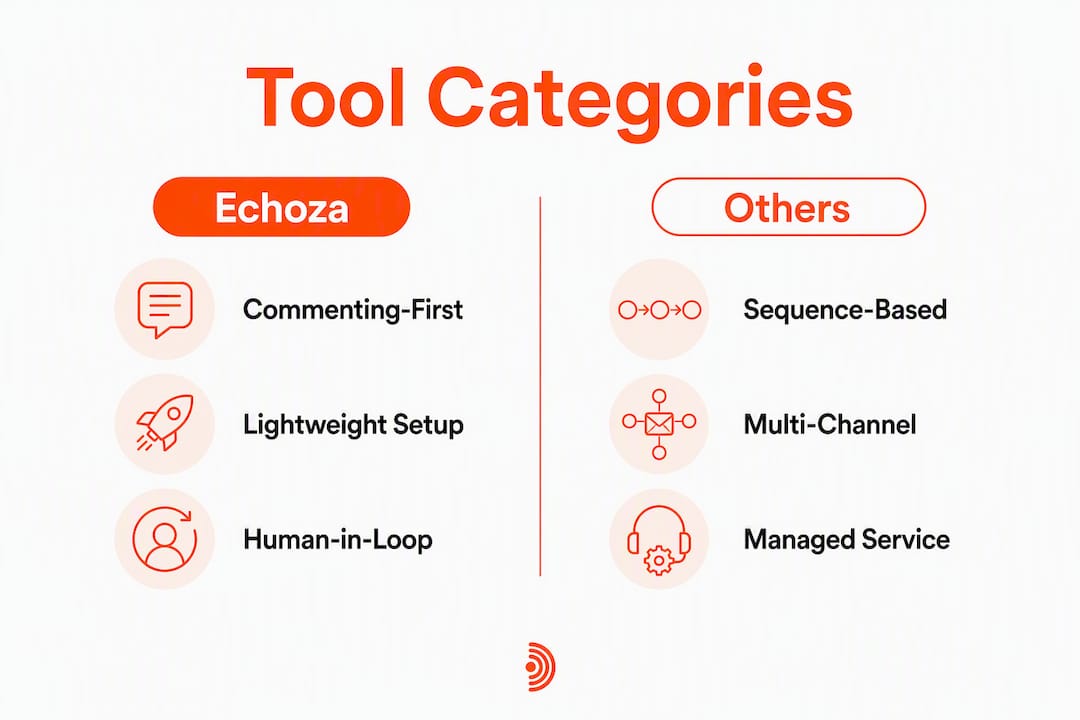
Echoza's commenting-first approach is a fundamentally different motion from sequence-based platforms. Where cloud multi-account tools push outbound volume, Echoza positions you inside conversations your audience is already having, which tends to generate warmer inbound responses. Browser-extension tools are cheap but cap out quickly for anyone managing more than one account. Multi-channel platforms bundle email and LinkedIn into one subscription, which can reduce tool sprawl if email is already your primary channel, but they add pricing and operational complexity for teams that only need LinkedIn.

Which evaluation dimensions actually affect your results?
The gap between tools that look similar on a feature list and tools that actually move the needle comes down to five things.
- List quality and intent signals. Platforms focused on intent signals, such as profile viewers and post engagers, report reply rates in the mid-teens to mid-forties compared to 1–3% for cold-list outreach. Commenting automation sidesteps the list problem entirely by targeting active, already-engaged discussions.
- Personalization depth. Voice matching matters. A comment that reads like you wrote it gets replies; a generic "Great post!" gets ignored. Tools like Echoza, and voice-training resources like Prose Coach, approach this by learning your actual writing patterns rather than filling in a template.
- Integration depth. CRM enrichment and sequencing only work if your outreach tool syncs cleanly with Salesforce or HubSpot. Misalignment with Salesforce-driven GTM motions is one of the most common reasons teams switch away from HeyReach.
- Account safety controls. Per-sender daily caps and rate limiting are not optional. Without them, LinkedIn's detection systems flag unusual activity fast.
- Operational debt. Stitching multiple tools together — enrichment, execution, CRM sync — adds maintenance time that compounds with every tool you add.
Pro Tip: Watch out for list-first automation tools that scale volume without surfacing buying-intent signals. Poor list quality reduces ROI regardless of how good the personalization features are.
Most users see measurable profile view increases within the first 30 days of consistent commenting activity. Qualified conversations and inbound outreach typically follow in the 60–90 day window, once your presence in key discussions builds recognition.
Why Echoza is the recommended pick for U.S. LinkedIn users
Echoza is built specifically for professionals who want visibility through comments, not cold message volume. The core workflow: Echoza ranks your feed to surface high-reach posts where your audience is active, drafts a comment in your voice based on your writing history, holds it for your review, and posts it only after you approve. That human-in-the-loop step is what separates it from tools that fire automatically.
Key features that matter for this use case:
- AI comment drafts trained on your voice and past activity
- Approval workflow before any comment goes live
- Scheduled posting across working hours (no suspicious 3 AM activity)
- Multiple LinkedIn accounts and voice profiles for teams or agencies
- Daily activity caps to stay within LinkedIn's safe parameters
- Browser-extension integration for a lightweight setup
- CRM connectors via Zapier (HubSpot, Salesforce)
Echoza offers a 14-day free trial, no credit card required.
Pro Tip: Run Echoza within LinkedIn's native activity limits. Keeping daily comment volume conservative, especially in the first two weeks, significantly reduces suspension risk. The safety guide on automating LinkedIn comments covers the specific thresholds worth knowing.
How do you choose the right HeyReach alternative for your workflow?
Work through these steps before committing to any tool.
- Define your channel mix. Are you LinkedIn-comments-first, sequence-first, or email-first? The answer eliminates most categories immediately.
- Measure list quality and intent signals. If you are working from a cold list with no intent data, fix that before adding automation.
- Test AI personalization on a sample. Run 10–15 AI-drafted comments and check whether they sound like you. If they do not, the tool is not ready for your account.
- Map your integration requirements. Confirm the tool connects to Salesforce or HubSpot the way your pipeline actually works, not just via a generic Zapier zap.
- Evaluate safety controls. Ask for specific daily cap numbers and rate-limiting logic, not just "we follow LinkedIn guidelines."
- Calculate total operational cost. Subscription price plus integration maintenance time is the real number.
Questions to ask any vendor: Does the tool require human approval before posting? Is CRM sync via API or Zapier only? What are the exact daily activity caps per account? How does multi-account management work at the seat level? Who owns the data and can you export it?
Red flags: opaque activity limits, no human-in-the-loop option, missing CRM connectors, and managed services that take full control of your messaging without transparency into what gets sent.
Run a pilot of 30–50 contacts or 30–50 target posts for 30–90 days before scaling. That window gives you enough data on reply rate, profile views, and account health to make a confident decision.
When does a managed service make more sense than self-serve software?
Managed services add execution capacity, but they cost more and reduce your control over what gets said in your name. That trade-off is worth it in specific situations.
A managed service makes sense when:
- You have no internal staff to run campaigns
- You need to scale fast and lack campaign design expertise
- LinkedIn outreach is a small part of a larger agency engagement
Self-serve software is better when:
- Message quality and voice consistency matter to you
- You need iterative personalization tied to CRM data
- You want to test and adjust messaging without going through a vendor
The cost gap is real. Managed services typically carry high fixed monthly fees with limited visibility into daily activity. Self-serve tools run on subscription pricing with potential integration overhead, but you control every variable. Analysts note that managed services limit user control significantly — choose them only when you genuinely lack internal capacity.
One safety note: managed services can obscure risky account behaviors. Unless the vendor explicitly discloses their daily activity parameters and runs within LinkedIn-safe limits, you are trusting them with your account's health.
What integrations go beyond CRM?
LinkedIn automation tools that connect only to a CRM leave gaps in a modern GTM stack. The tools worth considering also connect to marketing automation platforms like Marketo or ActiveCampaign, sales engagement tools, Slack for team notifications, and data enrichment layers. Zapier and native webhooks are the most common bridges. Echoza's Zapier integration covers the most common handoffs, including pushing comment activity data into HubSpot workflows or triggering Slack alerts when a prospect engages. For teams running LinkedIn as part of a B2B growth stack, the ability to pass engagement signals downstream to email sequences or ad audiences is where the real leverage sits.
What should you expect from data export and reporting?
Reporting quality varies sharply across tool categories. Cloud multi-account platforms typically offer dashboard-level metrics on connection acceptance and reply rates. Browser-extension tools often provide minimal reporting. Echoza surfaces comment activity, profile view trends, and engagement metrics, with data exportable for analysis in your CRM or spreadsheet. Before committing to any tool, confirm you can export raw activity data, not just aggregated summaries. Vendor-locked reporting with no export option is a red flag, especially if you need to tie LinkedIn activity to pipeline metrics in Salesforce or HubSpot.
How does customer support differ across these tools?
Support quality tends to track with pricing tier and business model. Managed services include dedicated account management by design. Cloud multi-account platforms at the enterprise tier usually offer live chat and onboarding calls. Browser-extension freemium tools lean on documentation and community forums. Echoza provides support through its standard subscription tiers, with documentation covering setup, safety best practices, and integration guides. For teams new to LinkedIn automation, responsive support during the first 30 days matters more than most buyers anticipate, since account configuration errors in that window carry the highest suspension risk.
How do the interfaces compare across tool categories?
Echoza runs as a browser extension, which keeps the setup lightweight and the learning curve short. You see your feed, review AI-drafted comments, and approve or edit before anything posts. Cloud multi-account platforms typically run as web apps with dashboards for managing sequences, inboxes, and account health across seats. They are more powerful but take longer to configure correctly. Browser-extension tools feel familiar fast but hit limits quickly for team use. Multi-channel platforms carry the steepest learning curve because they manage email, LinkedIn, and inbox in one interface. If your team is small and LinkedIn-focused, the simpler the interface, the faster you will see results.
Which business sizes does each tool category fit?
Echoza fits freelancers, small business owners, content creators, and marketing teams up to mid-size. Its multi-account and voice-profile features make it workable for small agencies too. Cloud multi-account platforms are built for agencies and sales teams running 10+ LinkedIn seats. Freemium browser-extension tools serve solo operators and early-stage pilots well but do not scale for teams. Multi-channel platforms suit mid-market and enterprise teams with dedicated sales ops. Managed services fit any size that lacks internal campaign staff, though the cost structure favors larger budgets.
What do user reviews and case studies show?
Users who switch to a commenting-first approach consistently report two outcomes: more profile views within the first month, and warmer inbound messages from prospects who recognized them from comments before any direct outreach. The pattern holds across freelancers and small B2B teams. The contrast with cold-sequence tools is notable: sequence-heavy approaches generate more total activity but produce lower-quality conversations, particularly when the list lacks intent signals. Multiple comparison roundups recommend evaluating intent detection and safety features as the primary criteria before switching from HeyReach, which aligns with what users report in practice.
Key Takeaways
Echoza is the strongest HeyReach alternative for LinkedIn users who want AI-drafted comments in their own voice, a human approval step before anything posts, and daily safety caps that protect their account.
| Point | Details |
|---|---|
| Match tool to channel motion | Define whether you are comments-first, sequence-first, or email-first before evaluating any tool. |
| Intent signals beat list volume | Reply rates from intent-based targeting are typically in the mid-teens to mid-forties compared to 1–3% for cold-list outreach; commenting automation targets active discussions by design. |
| Operational debt is a real cost | Subscription price plus integration maintenance time is the true cost of stitching multiple tools together. |
| Pilot before scaling | Run a 30–50 post pilot over 30–90 days and measure profile views, replies, and account health before expanding. |
| Echoza for commenting automation | Echoza's approval workflow, voice-matched drafts, and daily caps make it the recommended pick for LinkedIn commenting. |
The case for keeping humans in the loop
The conventional wisdom in LinkedIn automation is that more volume equals more pipeline. Scale the sequences, add more accounts, send more messages. The data does not fully support that. Intent-based, signal-first approaches, including commenting inside active discussions, consistently outperform cold-list volume plays on conversation quality. The reason is simple: a comment in a thread your prospect is already reading is not an interruption. It is a contribution.
What most automation guides underestimate is the compounding value of voice consistency. A comment that sounds like you, reviewed by you, builds a recognizable presence over weeks. A comment fired automatically from a template does the opposite. The approval step in a tool like Echoza is not friction. It is the mechanism that keeps your brand coherent at scale.
Start small. Measure account health alongside reply rate. Add accounts or channels only after the first pilot shows stable safety metrics. The professionals who get the most from LinkedIn automation are not the ones who move fastest. They are the ones who move carefully enough to keep their accounts running.
Echoza gives you commenting automation that stays in your voice
Most LinkedIn automation tools optimize for volume. Echoza optimizes for presence. It drafts comments that sound like you, holds them for your approval, schedules them across working hours, and applies daily caps so your account stays safe. That combination, voice-matched AI drafts plus a human approval step, is what makes it the most practical HeyReach alternative for professionals who care about how they show up on LinkedIn.
Tiered subscription plans cover individuals, professionals, and small agencies. The 14-day free trial requires no credit card. Start with a 30–50 post pilot, review the AI drafts, and see how your profile view count moves before committing to a paid plan.
Useful sources and further reading
- Best HeyReach Alternatives (2026) | The GTM Directory — Covers motion misalignment as the primary switching reason and evaluates CRM integration depth.
- The Best HeyReach Alternatives in 2026 (Honest Breakdown) — Analyzes managed service trade-offs, operational debt, and intent-signal reply rates.
- 7 Best HeyReach Alternatives in 2026 (Tested) — Focuses on multi-channel platforms and tool consolidation for email-plus-LinkedIn stacks.
- 12 Best HeyReach Alternatives in 2026 (My Honest Take) — Covers freemium and low-cost options for solo users and early pilots.
- Top HeyReach Competitors & Alternatives — Market overview with emphasis on intent detection and safety feature evaluation.
- How to automate LinkedIn comments safely — Echoza's practical guide to daily caps, rate limits, and account safety.
- LinkedIn outreach automation tool alternatives — Broader comparison of LinkedIn automation approaches and integration considerations.