

Expandi is a cloud-based LinkedIn sequencer built for connection requests, multi-step messages, and email follow-ups. If your goal is automating personalized comments at scale, it's a capable platform, but it's not designed for that workflow. For comment-first automation, Echoza is the better fit.
- What Expandi does best: Smart Sequences with up to 9 conditions and 11 actions, launched in about 15 minutes, with dedicated country-based proxies per account for safety.
- Pricing signal: $99/month per seat on monthly billing; annual plans drop that to roughly $79/month equivalent, with a 7-day free trial.
- For commenting-first workflows: Echoza drafts AI-generated comments in your voice, routes them through a pre-approval step, and schedules them across working hours — a workflow Expandi's sequencer model doesn't replicate.
Table of Contents
- What does the Expandi LinkedIn automation tool actually do?
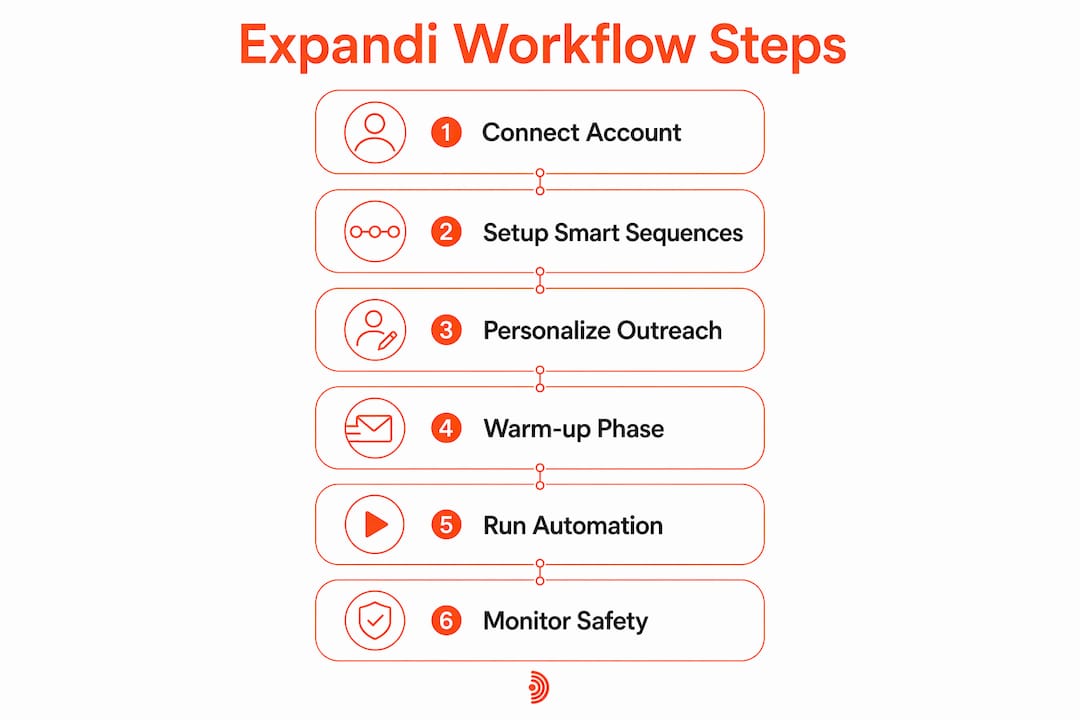
- How Expandi works in practice: sequences, warm-up, and safety
- Why commenting automation is a different class of tool
- How to choose a LinkedIn commenting automation tool for your goals
- How to launch a safe commenting campaign step by step
- Risks, LinkedIn policy signals, and safety best practices
- Why Echoza is the recommended fit for personalized LinkedIn commenting
- Key Takeaways
- The gap most LinkedIn automation guides won't tell you about
- Echoza: built for comment-first LinkedIn visibility
- Sources and further reading
What does the Expandi LinkedIn automation tool actually do?
Expandi runs entirely in the cloud. There's no Chrome extension to babysit, no desktop app to keep open. Each connected LinkedIn account gets its own dedicated country-based IP, which mimics human browsing behavior and reduces the risk of account restrictions compared to extension-based tools.
The core product is Smart Sequences: conditional, multi-step outreach flows that combine connection requests, LinkedIn messages, and email follow-ups in one campaign. You can build logic like "if the prospect accepted my connection but didn't reply in 3 days, send message B." Up to 9 conditions and 11 actions are available per sequence, and campaigns typically go live in about 15 minutes.
Personalization goes beyond first-name tokens. Through integrations like Hyperise, Expandi supports dynamic images and GIFs in messages, plus unlimited templates and per-step analytics. Agencies get additional features: multi-account dashboards, 110+ permission roles, white-label options, and a dedicated customer success manager on larger plans.
Industry analysts at LinkedInsider recommend Expandi specifically for agencies and sales teams that already use separate CRM and inbox tools. It's a specialized sequencing layer, not an all-in-one platform.
How Expandi works in practice: sequences, warm-up, and safety
When you connect a LinkedIn account, Expandi spins up a cloud-hosted browser session tied to a country-matched IP. The built-in warm-up ramps your daily activity gradually, which matters because LinkedIn's security filters flag sudden spikes in outreach volume.

Smart Sequences are the engine. You map out a flow: send connection request → wait 2 days → if accepted, send message A → if no reply in 3 days, send message B or trigger an email. Results often appear within 24 hours of launch for active campaigns, though meaningful pipeline movement takes longer.
Safety features worth knowing:
- Daily limit ranges are configurable and algorithm-assisted to avoid suspicious activity patterns.
- Duplication prevention stops the same prospect from entering two campaigns simultaneously.
- Blacklist lets you exclude existing clients or contacts you've already reached.
- Campaign prioritization controls which sequence runs first when accounts are active.
The honest ceiling: cloud-browser automation with a dedicated proxy reduces risk versus extension-based tools but sits below verified-API integrations on the safety spectrum. No automation tool eliminates detection risk entirely.
Pro Tip: Start every new account at 20–30% of your target daily volume and ramp up over 3–4 weeks. Jumping straight to 80+ actions per day is the fastest way to trigger a LinkedIn restriction, even with warm-up enabled.
Why commenting automation is a different class of tool
Expandi is a sequencer. Its job is moving a prospect through a structured funnel: connect, message, follow up. Commenting automation solves a different problem entirely.
When you automate comments, you're not initiating a sequence. You're inserting yourself into conversations that are already happening, on posts your target audience is already reading. The mechanics are completely different:
What a sequencer handles: Connection requests, direct messages, email follow-ups, conditional branching based on prospect responses.
What a commenting specialist handles: Feed ranking to surface relevant posts, AI-generated comment drafts matched to your voice and past activity, a pre-approval step so you review before anything goes live, scheduling across working hours so comments appear organic, and multi-account voice profiles for agencies managing several clients.
The personalization requirement is also different. A sequencer personalizes a message with a name, company, or job title. A commenting tool needs to match your tone, your sentence rhythm, your typical level of formality. That's a voice-mimicry problem, not a template-fill problem. Expandi doesn't rank your feed, doesn't draft comments in your voice, and doesn't offer a comment-specific approval workflow. That's not a criticism — it's just a different tool for a different job.
How to choose a LinkedIn commenting automation tool for your goals
Before committing to any LinkedIn automation software, map your primary use case first. Everything else follows from that.
- Define your primary goal. Outreach sequences (connect + message funnels) or comment-based visibility (appearing in high-reach discussions)? These require different tools.
- Check the approval workflow. For commenting, you want human review before anything posts. Approval-first design protects your voice and your account.
- Evaluate the proxy and safety model. Cloud-based with dedicated IPs is safer than browser extensions. Verified-API integrations are safer still, but rare for commenting tools.
- Look at scheduling granularity. Can you restrict posting to business hours in your timezone? Random 2 AM comments read as automated immediately.
- Assess personalization depth. Does the tool learn your voice from past activity, or does it fill templates? Voice-matching matters for comments far more than for cold messages.
- Check integrations and reporting. Does it connect to your CRM or cold email automation stack? Can you see which comments drove profile views?
- Run the per-seat math. Expandi's $99/month per seat adds up fast for agencies. Annual billing saves roughly 20%. Commenting-specialist tools often use per-account or tiered models instead.
When to pick a sequencer like Expandi: You're running outbound sales, you need multi-step message funnels, and you already have a CRM and inbox tool in place.
When to pick a commenting specialist like Echoza: Your goal is visibility and inbound engagement, you want to show up consistently in your audience's feed, and you need AI-drafted comments that sound like you, not a template.
- For LinkedIn outreach automation alternatives, the tool category matters more than the feature list.
- Annual discounts change unit economics significantly: $99/month per seat drops to $79/month equivalent on the annual plan when paid upfront.
How to launch a safe commenting campaign step by step
| Phase | Action | Timeline |
|---|---|---|
| Setup | Define ICP, connect account, configure voice profile | Day 1 |
| Warm-up | Start at low daily caps (5–10 comments/day) | Week 1–2 |
| Pilot | Run 1-week test on 2–3 seed topics, track reply rate and profile views | Week 2–3 |
| Review | Approve comments individually, adjust tone settings | Ongoing |
| Scale | Increase daily caps gradually based on account health | Week 4+ |
The sequence that works: define your ideal commenter profile and voice first, then connect your account, import seed topics or target post types, configure your approval workflow, set daily caps, and schedule your first batch. Don't skip the approval step during the pilot, even if it feels slow.
Pro Tip: During your pilot week, track profile views and comment reply rates separately. A high reply rate with flat profile views means your comments are good but not visible enough. Flat reply rate with rising profile views means you're getting seen but not compelling enough to respond to. Each problem has a different fix.
For a deeper look at staying safe while automating, the guide to automating LinkedIn comments without getting banned covers the specific pitfalls worth avoiding.
Risks, LinkedIn policy signals, and safety best practices
LinkedIn's terms prohibit automated actions that simulate human behavior at scale. That's the baseline. Every automation tool operates in that gray zone, and the risk level varies by architecture and usage pattern.
Do:
- Keep every comment unique. Identical comments across multiple posts are the clearest automation signal.
- Use pre-approval workflows so a human reviews before anything posts.
- Set daily caps well below LinkedIn's informal thresholds and ramp slowly.
- Monitor account health daily during the first month.
- Maintain a blacklist of existing clients and warm contacts.
Don't:
- Run commenting campaigns 24/7. Restrict activity to business hours.
- Ignore reply notifications. Unanswered replies on automated comments look worse than no comment at all.
- Assume a dedicated proxy makes you invisible. It reduces risk; it doesn't eliminate it.
The LinkedIn automation warning signals to watch for include sudden drops in connection acceptance rates, profile view spikes followed by drops, and any in-app warning messages from LinkedIn. When those appear, pause immediately and reduce volume before resuming.
Why Echoza is the recommended fit for personalized LinkedIn commenting
Echoza is built specifically for the workflow that Expandi doesn't cover: AI-driven comment drafts that match your voice, routed through approval before they post, scheduled across working hours, with daily activity caps and multi-account voice profiles for teams.
The AI learns from your past activity and writing style. When it drafts a comment on a relevant post, it sounds like you wrote it, not like a template someone filled in. You review it, approve or edit, and it posts at a scheduled time that looks organic. For individual professionals, that means consistent visibility without writing every comment manually. For freelancers, it means showing up in the right conversations without spending an hour a day on LinkedIn. For small agencies managing multiple clients, the multi-account voice profiles keep each client's tone distinct.
The browser extension integration means setup is straightforward. You don't need a developer or a complex CRM connection to get started. A free trial lets you test the approval flow, the scheduling, and the voice-matching before committing.
Key Takeaways
Expandi excels at multi-step outreach sequences, but for AI-driven, voice-matched LinkedIn commenting, Echoza is the purpose-built choice.
| Point | Details |
|---|---|
| Expandi's core strength | Multi-step Smart Sequences with multiple conditions and actions, best for outbound sales funnels. |
| Pricing reality | Expandi charges $99/month per seat on monthly billing; annual plans paid upfront reduce that to $79/month per seat equivalent, and include a 7-day free trial. |
| Commenting vs. sequencing | Comment automation requires feed ranking, voice-matching, and approval workflows — capabilities sequencers aren't designed for. |
| Safety ceiling | Cloud-based proxies reduce risk versus extensions but don't match verified-API safety; daily caps and warm-up are non-negotiable. |
| Echoza's fit | Echoza drafts AI comments in your voice, routes them through pre-approval, and schedules them across working hours for consistent, human-first visibility. |
The gap most LinkedIn automation guides won't tell you about
Most comparisons of LinkedIn automation software treat "personalization" as a single feature. It isn't. There's template personalization, where a tool fills in a name or company, and there's voice personalization, where a tool learns how you actually write and replicates that pattern. Sequencers like Expandi do the first well. Commenting specialists need to do the second.
The reason this matters: a comment that sounds like a template gets ignored or, worse, flagged as spam by the post author. A comment that sounds like you, that reflects your actual perspective on the topic, drives replies and profile visits. That's the whole point of comment-based visibility. Automation that doesn't clear that bar isn't saving you time — it's just generating noise.
The other thing worth saying plainly: human approval isn't optional for comment automation. It's the line between a tool that builds your reputation and one that quietly damages it. Any commenting tool that posts without a review step is asking you to trust an AI with your professional voice, unsupervised. That's a risk no daily cap can fully offset.
Echoza: built for comment-first LinkedIn visibility
If your goal is showing up consistently in your audience's feed without writing every comment yourself, Echoza gives you the fastest path to that outcome. You get AI-drafted comments in your own voice, a pre-approval step so nothing posts without your sign-off, scheduling across business hours, and daily caps that keep your account in safe territory.
The free trial is the right place to start. Connect your account, run the approval flow on a handful of comments, and check whether the voice-matching reflects how you actually write. Most users see the difference within the first session. From there, you can expand to multiple accounts or topic categories as your confidence in the workflow grows.
Start your free trial at Echoza and run your first commenting pilot this week.
Sources and further reading
The factual claims in this article draw from the following sources:
- Expandi pricing and trial details (monthly $99/seat, annual discount, 7-day trial): Expandi Pricing
- Expandi architecture and proxy model (dedicated country-based IP, cloud-hosted sessions, warm-up): Expandi Homepage
- Smart Sequences capabilities (9 conditions, 11 actions, 15-minute launch, 24-hour results): Expandi Smart Campaigns
- Agency features and buyer-fit guidance: Expandi Agency Page
- Independent analyst review and safety ceiling assessment: LinkedInsider Expandi Review
- Safe comment automation best practices: How to Automate LinkedIn Comments Without Getting Banned
- LinkedIn automation warning signals: LinkedIn Automation Tool Warning
- Echoza product and trial: Echoza