

LinkedIn hashtags remain a measurable visibility tool in 2026, but their function has changed significantly since 2024. Posts with at least one hashtag receive 85% more impressions than posts without any. That number alone answers whether hashtags are still relevant on LinkedIn. The real question is how to use them correctly, because the platform no longer works the way most professionals assume. Hashtag feeds are gone, desktop tags are no longer clickable, and the algorithm has shifted toward keyword-driven discovery. Knowing what changed, and what still works, separates professionals who grow from those who spin their wheels.
Are hashtags still relevant on LinkedIn in 2026?
Yes, but their role has narrowed. LinkedIn hashtags now function as categorization signals rather than viral discovery channels. They tell the algorithm what your post is about, and they route content to users who have followed those topics. That is a more limited job than most marketers expect, but it is still a real one.
The platform made several structural changes starting in late 2024 that reshaped how hashtags operate:
- Hashtag pages removed. LinkedIn eliminated dedicated hashtag feed pages, so users can no longer browse a stream of posts under a single tag.
- Desktop hashtags no longer clickable. Hashtags on desktop lost their hyperlink function, which means they do not drive discovery the way they once did.
- Hashtag following disabled. Users can no longer follow specific hashtags to curate their feed, which cuts off one of the main reach pathways hashtags provided.
- Business page hashtags renamed. LinkedIn rebranded the hashtag feature for Company Pages, shifting focus toward "Specialisms" keywords instead.
- Algorithm pivot to keywords. LinkedIn's ranking system now weighs keyword-rich post copy more heavily than hashtag volume.
These changes do not make hashtags useless. They make hashtags a supporting signal rather than a primary growth lever. Professionals who treat them as the latter will be disappointed. Those who treat them as a finishing touch on strong content will still see measurable lift.
What does the data say about hashtag effectiveness?

The numbers tell a clear story, and it is more nuanced than a simple yes or no.
Posts with hashtags average 6,319 impressions on Company Pages and 5,449 on Personal Profiles, compared to roughly 820 impressions for posts without any hashtags. That gap is substantial. It reflects how the algorithm still uses hashtag signals to distribute content to relevant audiences, even without clickable feed pages.
The sweet spot for engagement is 3–5 hashtags. An analysis of 2.3 million posts shows that using 3–5 hashtags produces 17% higher engagement compared to posts with none. That same research shows that using 11 or more hashtags causes a 12% engagement drop and an 18% reach decline. More is not better on LinkedIn.
| Hashtag count | Engagement impact | Reach impact |
|---|---|---|
| 0 hashtags | Baseline | Baseline |
| 1 hashtag | +12.6% engagement lift | Modest improvement |
| 3–5 hashtags | +17% engagement | Strongest reach |
| 6–10 hashtags | Declining returns | Readability suffers |
| 11+ hashtags | 12% drop | 18% reach decline |
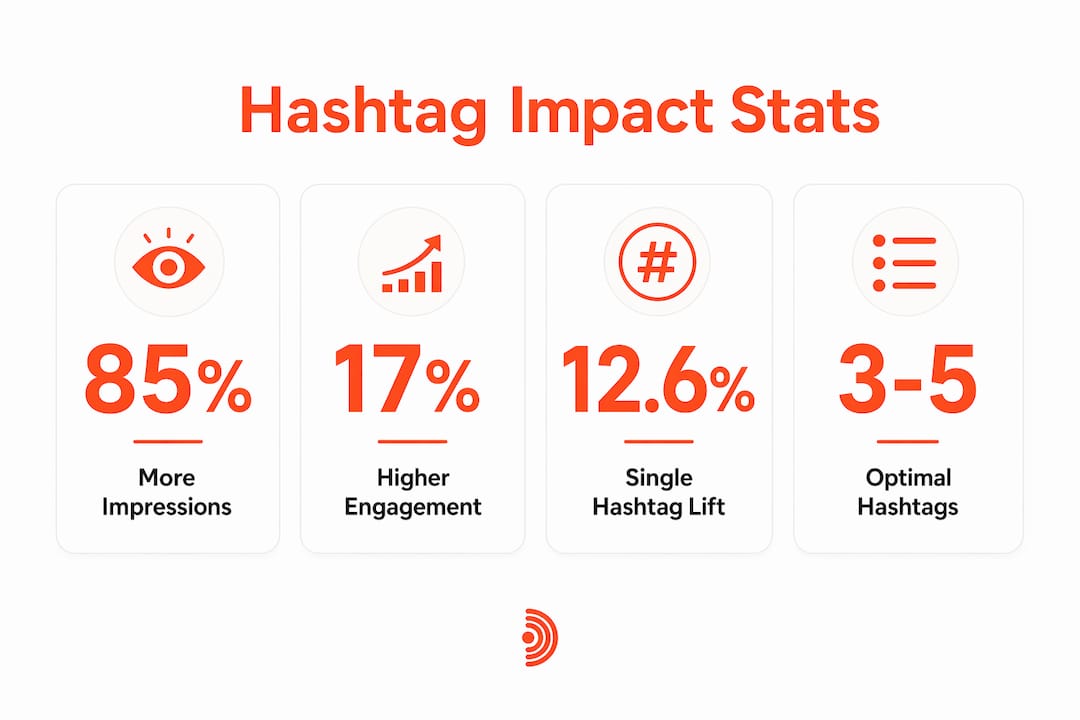
A single relevant hashtag still produces a 12.6% engagement lift. That is meaningful for a tactic that takes five seconds to apply. The data makes the case for precision over volume.
Pro Tip: Check your post analytics 48–72 hours after publishing. LinkedIn breaks down impressions by "people who follow hashtags you used," giving you a direct read on which tags are actually driving reach for your content.
Common misconceptions about LinkedIn hashtags
The biggest mistake professionals make is treating LinkedIn like Instagram. LinkedIn hashtags are not viral growth hacks. They act as targeted distribution signals to people who have explicitly followed those topics, not as a mechanism to push content into trending feeds.
Several myths persist that hurt LinkedIn hashtag strategy:
- Myth: More hashtags mean more reach. The data shows the opposite. Engagement drops sharply beyond five tags, and spam filters become a real risk.
- Myth: Broad hashtags outperform niche ones. Niche hashtags generate roughly 28% higher engagement than broad tags. A smaller, more relevant audience engages more than a massive, indifferent one.
- Myth: Hashtags substitute for content quality. Hashtags extend reach. They do not create it. A weak post with five hashtags will still underperform a strong post with two.
- Myth: Using the same hashtags every time is fine. LinkedIn's algorithm flags repetitive hashtag patterns as potential spam. Rotating your tags protects your reach.
The expert consensus in 2026 points toward combining hashtags with keyword-rich post copy. Top LinkedIn users pair hashtags with strong keyword integration in the post body itself, working with the platform's keyword-driven algorithm rather than relying on hashtags alone. Hashtags contribute to LinkedIn's keyword-driven ranking as SEO signals, not as standalone reach drivers.
Pro Tip: Build a "hashtag bank" of 8–10 tags relevant to your niche. Rotate 2–3 core brand-relevant tags with 1–2 content-specific tags per post. This keeps your tagging fresh and reduces spam flag risk.
How to build a practical LinkedIn hashtag strategy
A working LinkedIn hashtag strategy in 2026 follows a few clear rules. Apply them consistently and you will see the difference in your post analytics within a few weeks.
Choose the right mix of hashtags
Combine three types of tags in each post. Broad hashtags like #Marketing or #Leadership reach large audiences but produce lower engagement rates. Niche hashtags like #B2BSaaSMarketing or #FreelanceDesign reach smaller audiences who engage more actively. Branded hashtags like your company name or a campaign tag build community over time. A post that uses one broad, two niche, and one branded tag covers all three bases without exceeding the optimal range.
Place hashtags at the end of your post
Hashtags embedded mid-sentence interrupt reading flow and reduce the perceived quality of your content. Place them at the end of your post copy, after the main message is complete. This keeps the post readable and still delivers the categorization signal to the algorithm.
Rotate your hashtag sets
Rotating a hashtag bank with 2–3 core brand-relevant tags plus 1–2 content-specific tags helps maintain reach and prevents spam flags. Using the exact same set of hashtags on every post is a pattern LinkedIn's algorithm penalizes. Keep a spreadsheet of 8–10 relevant tags and vary your selection with each post.
Track performance in post analytics
LinkedIn analytics show impressions broken down by source, including followers of the hashtags you used. Check this data 48–72 hours after posting. If a hashtag consistently drives zero impressions, replace it. If one drives a disproportionate share, use it more often.
Consider Company Page Specialisms
LinkedIn Company Pages can add up to 20 "Specialisms" keywords in their About section. These Specialisms keywords act as permanent hashtags that improve searchability without requiring the hashtag symbol in every post. For brands managing a Company Page, this is a free and underused visibility tool.
Pro Tip: Pair your hashtags with a strong opening line. The algorithm weighs the first two lines of your post heavily. A keyword-rich hook combined with 3–5 relevant hashtags gives the algorithm two clear signals about your content's topic.
Hashtags work best as a finishing touch on strong content, not as a substitute for it. Write the post first. Add the hashtags last.
Key Takeaways
LinkedIn hashtags still drive measurable reach in 2026, but only when used with precision: 3–5 relevant tags, rotated regularly, placed after strong keyword-rich copy.
| Point | Details |
|---|---|
| Hashtags still boost impressions | Posts with hashtags average 85% more impressions than posts without any. |
| Optimal range is 3–5 tags | Using 3–5 hashtags produces 17% higher engagement; 11+ causes a 12% drop. |
| Niche beats broad | Niche hashtags generate roughly 28% higher engagement than broad tags. |
| Rotate your hashtag sets | Using the same tags every post risks spam flags; build a bank and rotate. |
| Pair with keyword-rich copy | Hashtags work as SEO signals alongside strong post copy, not instead of it. |
What I've learned from watching hashtags evolve on LinkedIn
The professionals I see struggle most with hashtags are the ones who learned the rules in 2021 and never updated them. They pile on 15 tags, use #Entrepreneur and #Motivation on every post, and wonder why their reach is flat. The platform changed. Their approach did not.
The more interesting shift is how hashtags now interact with LinkedIn's broader keyword algorithm. A post about LinkedIn click-through rates that uses #CTR and #LinkedInMarketing in the copy and as hashtags gets a double signal boost. The algorithm sees the keyword in the text and in the tag. That compounding effect is real, and most professionals ignore it entirely.
My honest view is that hashtags are worth about five minutes of thought per post, not more. Pick 3–5 tags that match the specific topic of that post. Rotate them. Check the analytics. Move on. The bigger investment should go into your hook, your content quality, and where you show up in other people's conversations. Hashtags extend reach. They do not build authority. Confusing those two jobs is where most LinkedIn strategies go wrong.
— Nicolas
How Echoza fits into your LinkedIn visibility approach
Hashtags get your posts in front of the right people. But the fastest way to build visibility on LinkedIn is to show up inside conversations your audience is already having.
Echoza drafts comments in your voice and places you inside high-reach discussions where your ideal clients are already engaged. Users report more profile views and direct client outreach without publishing a single extra post. If you are already refining your hashtag strategy, adding a comment engagement layer multiplies the effect. Win more clients from the comments you leave, not just the posts you publish.
FAQ
Do hashtags still work on LinkedIn in 2026?
Yes. Posts with at least one hashtag receive approximately 85% more impressions than posts without any. Hashtags now function as categorization signals rather than viral discovery tools, but they still extend reach to relevant audiences.
How many hashtags should I use on a LinkedIn post?
Use 3–5 hashtags per post. An analysis of 2.3 million posts shows this range produces 17% higher engagement. Using 11 or more hashtags causes a 12% engagement drop and an 18% reach decline.
Are niche or broad hashtags better on LinkedIn?
Niche hashtags generate roughly 28% higher engagement than broad tags on LinkedIn. Smaller, more relevant audiences engage more actively than large, general ones.
Where should I put hashtags in a LinkedIn post?
Place hashtags at the end of your post copy, after the main message. This keeps the post readable and still delivers the topic signal to LinkedIn's algorithm.
Can I use the same hashtags on every post?
Repeating the exact same hashtag set on every post risks triggering LinkedIn's spam filters. Rotate a bank of 8–10 relevant tags, using 2–3 core tags plus 1–2 content-specific tags per post.